
‹ Unlocking the Power of Atlas
Unlocking the Power of Atlas (8): Writing your own Analyzer — 2
CallGraphAtlasScript turns the shell queries into plug-in code, and the sample smart views respond to a selection.
This is the concluding part of the two-parter on Atlas plug-ins. In part 1, we looked at how to import a sample Atlas plug-in and its anatomy. In this part, we will get into the details of what makes it work.
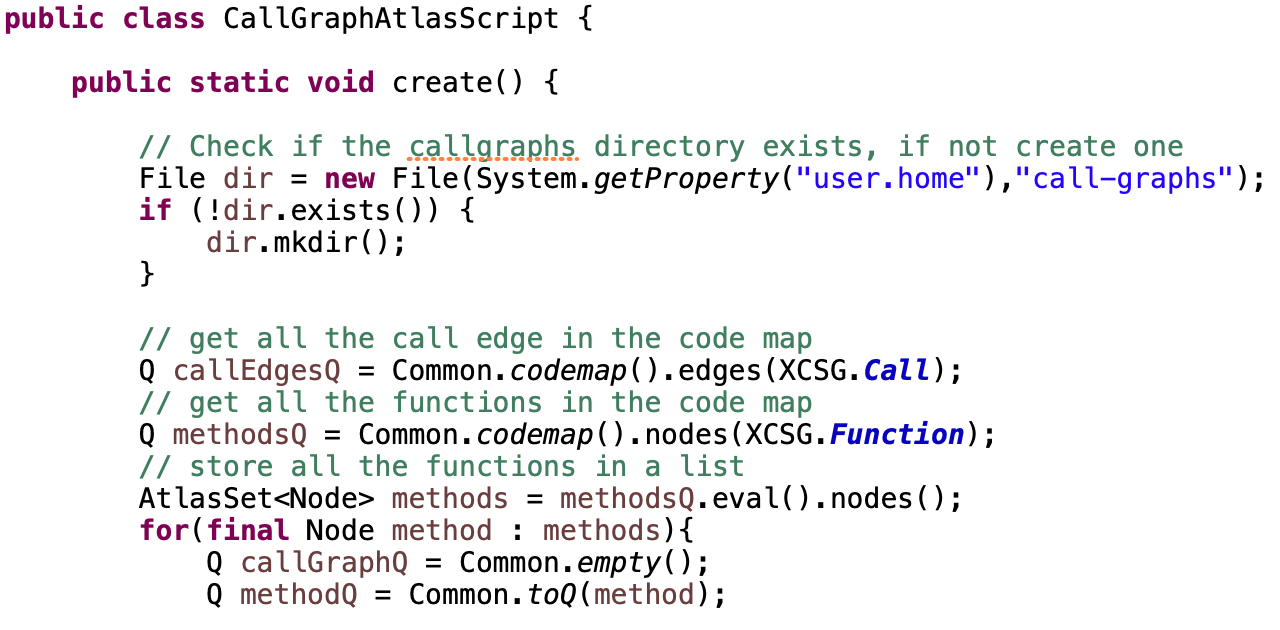
CallGraphAtlasScript
This script, which comes as part of the sample Atlas plug-in, begins by creating a directory in your home directory. It’s important to note that this part is written in vanilla Java. Then it has the following code
// get all the call edge in the code map
Q callEdgesQ = Common.codemap().edges(XCSG.Call);
// get all the functions in the code map
Q methodsQ = Common.codemap().nodes(XCSG.Function);
// store all the functions in a list
AtlasSet<Node> methods = methodsQ.eval().nodes();
The comments in the code are self-explanatory, but there are two key variable types we want to highlight: Q and 'AtlasSet<Node>'. These are Atlas-specific types embedded within Java. Following are the types in the eDSL representing Atlas graph artifacts:
- Q represents a query.
- Graph the underlying result of any query, a union of a node set and edge set. Q.eval() evaluates the query and returns a Graph.
- AtlasSet<Node> node set of the graph. Graph.nodes() fetches the node set of the graph.
- AtlasSet<Edge> node set of the graph. Graph.edges() fetches the node set of the graph.
- Finally, Node and Edge represent nodes and edges respectively.
In Atlas, 'AtlasSet<T>' is an interface, and 'AtlasHashSet<T>' is its implementation. These classes are specifically optimized for graph operations, making them ideal for handling large graphs.
'AtlasSet<T>' is iterable, allowing the code to iterate over its members and compute the corresponding Call Graph. The resulting graphs are then saved as .jpg files in the directory created earlier.
Testing the Atlas plug-in
There are different ways to deploy an Atlas plug-in, but deployment itself is a separate topic requiring software engineering expertise beyond the scope of this article. Instead, we will focus on how to easily test your script.
First make sure to index a codebase you wish to analyze. Now right-click on your plug-in in Project Explorer and then click Atlas -> Open Atlas Shell. This opens a custom Atlas Shell with your plug-in installed. You can import your scripts and then run them. E.g. you can run the CallGraphAtlasScript as follows,
// Assuming plug-in name com.ensoftcorp.demo
import com.ensoftcorp.demo.CallGraphAtlasScript
// the code to save call graph images is in the method create()
CallGraphAtlasScript.create()
This provides just a glimpse of how to create your own analyzers in Atlas. Developing a custom analyzer also involves formulating your specific problem. Atlas is designed to alleviate some of the complexity by offering easy ways to manipulate program artifacts as graphs. For reference, check out our toolbox-commons on GitHub, which includes implementations of many commonly used utilities for building sophisticated software analyzers.
Smart View scripts
The sample plug-in also includes three smart view scripts. Smart view scripts are no different except they are internally linked to the Smart View component of Atlas toolchain. Each script contains a method selectionChanged() with a parameter input. You can edit this method with your script and it will create a smart view for you. When you select any program artifact, the input parameter is linked to it and your smart view will automatically execute the selectionChanged() method. This is a more advanced topic, and we recommend starting with simpler scripts before diving into smart view scripts. If you’re particularly interested in smart view scripts, feel free to reach out to us — we’d be happy to assist you with your specific needs.
This concludes our introductory series on Atlas. Atlas is a powerful tool for software analysis, complete with convenient visualization capabilities. We plan to create more series in the future, focusing on specific types of analyses and applications. If you’d like to learn more about Atlas or are interested in specific analyzers, feel free to reach out to us at https://www.ensoftcorp.com/atlas/.
Have a question or want us to fix something?
Thank you.
We have your note about this page.