
Integrating SimDiff in GitHub workflows
A GitHub Actions workflow on a self-hosted Windows runner runs SimDiff Automation and publishes a peer review file.
Introduction
These steps put SimDiff Automation in a Git workflow with Simulink model files. The example uses GitHub Actions.
When a change to a Simulink file is pushed, a GitHub Actions workflow uses SimDiff Automation to create a peer review file of the changes and uploads it to GitHub as an artifact. This example uses a self-hosted runner on a local Windows PC.
Getting started with a simple example
Prerequisites
- A GitHub account
- A repo in GitHub with your Simulink files
- A Windows PC with Simulink, Git, and SimDiff Automation installed
Access a GitHub repo
You need a GitHub account and a repo that contains Simulink files. Import the sample repository:
- In GitHub, open the Repositories tab and click New.

- Click Import a repository.

- In the URL for your source repository, type
https://github.com/EnSoftCorp/github-integration.git.
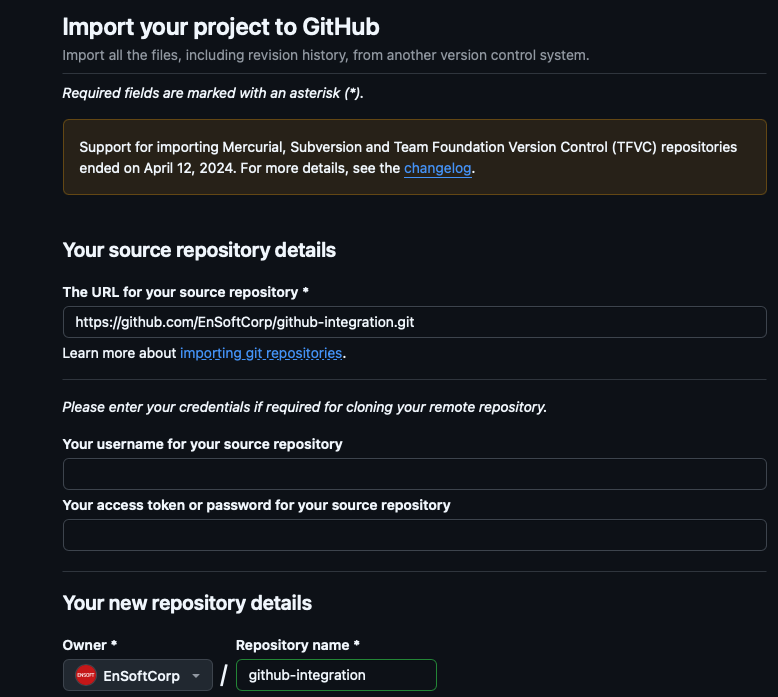
- Click Begin import. The repository is imported.
The repository has two branches, main and dev. The main branch has aero_radmod.slx and a YAML file in .github/workflows that tells the workflow what to run. That YAML file is already set up to use SimDiff to report changes between file versions.
Clone the repo on your computer
Clone the same Git repository on a local Windows PC. The clone URL is under the Code button on the Code tab.
git clone git@github.com:##YourRepoURLinGitSet up Git credentials for GitHub. Clone your own GitHub repo, not the sample repo you imported from.
Configure and run a self-hosted runner
GitHub documents adding a self-hosted runner in Adding self-hosted runners. The steps below follow that page.
- To add a self-hosted runner, open the Settings tab in your repo. In the left sidebar click Actions, then Runners. Click New self-hosted runner.
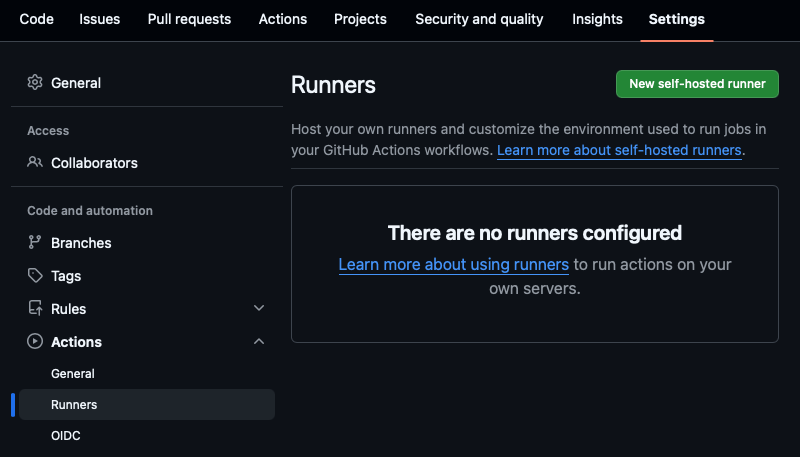
- On the Add new self-hosted runner page, click Windows and choose the architecture (x64 is the default). Download and configure the runner by running the steps shown there in Windows PowerShell. An example is below.
# Create a folder under the drive root
$ mkdir actions-runner; cd actions-runner

# Download the latest runner package
$ Invoke-WebRequest -Uri https://github.com/actions/runner/releases/download/v2.333.1/actions-runner-win-x64-2.333.1.zip
-OutFile actions-runner-win-x64-2.333.1.zip

# Optional: Validate the hash
$ if((Get-FileHash -Path actions-runner-win-x64-2.333.1.zip -Algorithm SHA256).Hash.ToUpper()
  -ne 'd0c4fcb91f8f0754d478db5d61db533bba14cad6c4676a9b93c0b7c2a3969aa0'.ToUpper()){ throw 'Computed checksum did not match' }

# Extract the installer
$ Add-Type -AssemblyName System.IO.Compression.FileSystem ; [System.IO.Compression.ZipFile]::ExtractToDirectory("$PWD/actions-runner-win-x64-2.333.1.zip", "$PWD")- Configure and run the runner with the commands GitHub shows. An example is below.
 Create the runner and start the configuration experience
$ ./config.cmd --url https://github.com/nikhilranade/##YourRepoURLinGit --token Token

# Run it!
$ ./run.cmd
Push a change in Git
With the runner configured, check the items below, then push a change to trigger the GitHub Action.
Verify the SimDiff Automation installation. The YAML file assumes SimDiff Automation is installed at C:\Program Files\EnSoft\SimDiff Automation. Change that location in the YAML file if it is not.
Configure SimDiff Automation. Configure the license and MATLAB installations by running sd4.exe with the -license and -matlabSetup command-line options. Then check that a report can be generated from the command line.
Review the YAML file. This sample triggers SimDiff to generate a peer review file. When a change to aero_radmod.slx is pushed, the workflow generates the report and uploads it. A later section extends this so every changed model file gets a report.
#Generate Peer Review File
name: SimDiff Peer Review File Generation

on:
push:
  branches:
    - '**'   # all branches
pull_request:

jobs:
simdiff_peer_review:
  name: Generate SimDiff Peer Review File
  runs-on: self-hosted   # your Windows self-hosted runner

  steps:
    - name: Checkout repository
      uses: actions/checkout@v4
      with:
        fetch-depth: 2

    # ============ Set up DiffTool ===============
    - name: Prepare SimDiff command
      shell: 'powershell -ExecutionPolicy Bypass -File {0}'
      run: |
        git config --local difftool.simdiff.cmd '\"C:/Program Files/EnSoft/SimDiff Automation/sd4.exe\" -l \"$LOCAL\" -r \"$REMOTE\" -export aero_radmod_peerreview.html'

    # ============ Invoke SimDiff ===============
    - name: Run SimDiff comparison
      shell: 'powershell -ExecutionPolicy Bypass -File {0}'
      run: |
        Write-Host "Comparing with SimDiff..."
        git difftool -y -t simdiff HEAD~1 HEAD .\aero_radmod.slx

    # ============ Publish Artifact ===============
    - name: Upload SimDiff Peer Review File
      uses: actions/upload-artifact@v4
      with:
        name: aero_radmod_peerreview
        path: aero_radmod_peerreview.html
Change the model file and push. Change aero_radmod.slx, commit it, and push.
That starts a GitHub Action. The self-hosted runner on the local PC generates a SimDiff peer review file and uploads it as an artifact to GitHub.
Observe the report artifact on GitHub
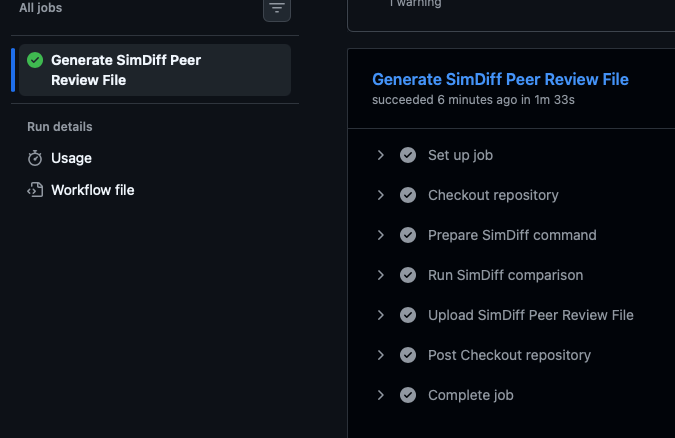
- Go to Actions, All workflows. Open the most recent run and go to the Artifacts section at the bottom. Click the peer review file to download it.

- Click the job to see the details.
Comparing all changed model files in a commit
The earlier example assumed that a file named aero_radmod.slx was changed. To report every model file that changed in a commit, change the YAML file so it calls a Python script. A push that changes model files then creates a report for each changed file and uploads the reports as an artifact. The sample script compares the current version of the file (HEAD) with the version in the previous commit.
Prerequisites
Install Python on the local machine, in addition to the prerequisites above. Switch to the dev branch of the sample repository to see the updated files.
Repository changes
The dev branch has a modified YAML file, in .github/workflows, that calls a new Python script.
Updated YAML:
#Generate Peer Review File
name: SimDiff Peer Review File Generation

on:
push:
  branches:
    - '**'   # all branches
pull_request:

jobs:
simdiff_peer_review:
  name: Generate SimDiff Peer Review File
  runs-on: self-hosted   # your Windows self-hosted runner

  steps:
    - name: Checkout repository
      uses: actions/checkout@v4
      with:
        fetch-depth: 2


    # ============ Invoke SimDiff ===============
    - name: Run SimDiff comparison
      shell: 'powershell -ExecutionPolicy Bypass -File {0}'
      run: |
        Write-Host "Comparing with SimDiff..."
        python .\diff.py reports HEAD~1 HEAD

    # ============ Publish Artifact ===============
    - name: Upload SimDiff Peer Review File
      uses: actions/upload-artifact@v4
      with:
        name: simdiff peer review files
        path: reports
Python script. The listing for diff.py is below.
import subprocess
import os
import sys

# Function to get the list of modified files in the commit
def get_modified_files():
 try:
     # Get the list of modified files (slx files) in the current commit
     result = subprocess.run(['git', 'diff', commit1, commit2, '--name-only', '--diff-filter=M'], stdout=subprocess.PIPE,
                             text=True,      # Ensure output is in string format
                             check=True)     # Raise an error if the command fails
     # Filter to include only Simulink model files (.slx or .mdl)
     modified_files = [line for line in result.stdout.splitlines() if (line.endswith('.slx') or line.endswith('.mdl'))]
     return modified_files
 except subprocess.CalledProcessError as e:
     print(f"Error getting modified files: {e}")
     return []

# Function to call SimDiff for each file
def run_simdiff_for_files(file):
     try:
         # Call the difftool (replace 'simdiff' with the actual command if different)
         report_file = f"{reportsDir}/" + file.removesuffix(".slx") + ".peerreview.html"
         print(f"    report_file= {report_file}")

         # Ensure report directory is created if it doesn't exist
         report_path = os.path.dirname(report_file)
         os.makedirs(report_path, exist_ok=True)

         path_to_diff_tool = f'"\'C:/Program Files/EnSoft/SimDiff Automation/sd4.exe\' -l $LOCAL -r $REMOTE -export {report_file}"'
         config_cmd = f'git config --local difftool.sd4.cmd {path_to_diff_tool}'
         #print(f"    config_cmd= {config_cmd}")
         subprocess.run(config_cmd, text=True, check=True, shell=True)
         diff_cmd = f'git difftool -y -t sd4 {commit1} {commit2} {file}'
         #print(f"    diff_cmd= {diff_cmd}")
         subprocess.run(diff_cmd, text=True, shell=True)

         #print(f"    SimDiff ran successfully for {file}\n")
     except subprocess.CalledProcessError as e:
         print(f"Error running SimDiff on {file}: {e}")

def main():
 modified_files = get_modified_files()
 if modified_files:
     print("Modified Simulink models:")
     for file in modified_files:
         print(f" - {file}")
         run_simdiff_for_files(file)
 else:
     print("No modified Simulink models found.")

if __name__ == '__main__':
 reportsDir = sys.argv[1]
 commit1 = sys.argv[2]
 commit2 = sys.argv[3]
 main()
Make changes to model files and push
When you push changes, a report is created for each changed model file and uploaded as an artifact.
Metadata
To include metadata in the generated peer review files, contact ENSOFT. ENSOFT will provide the configuration steps.
Contact
Questions about these steps: support@ensoftcorp.com.
Have a question or want us to fix something?
Thank you.
We have your note about this page.