
GitHub ワークフローに SimDiff を組み込む
セルフホストのWindowsランナー上のGitHub Actionsワークフローが、SimDiff Automationを実行し、ピアレビューファイルを公開します。
はじめに
これらの手順では、Simulinkモデルファイルを扱うGitワークフローにSimDiff Automationを組み込みます。この例ではGitHub Actionsを使用します。
Simulinkファイルへの変更がプッシュされると、GitHub ActionsのワークフローがSimDiff Automationを使用して差分のピアレビューファイルを作成し、GitHubにアーティファクトとしてアップロードします。この例では、ローカルのWindows PC上のセルフホストランナーを使用します。
簡単な例で始める
前提条件
- GitHubアカウント
- Simulinkファイルを含むGitHub上のリポジトリ
- Simulink、Git、SimDiff AutomationがインストールされたWindows PC
GitHubリポジトリにアクセスする
GitHubアカウントと、Simulinkファイルを含むリポジトリが必要です。サンプルリポジトリをインポートします。
- GitHubでRepositoriesタブを開き、Newをクリックします。

- Import a repositoryをクリックします。

- ソースリポジトリのURLに、
https://github.com/EnSoftCorp/github-integration.gitと入力します。
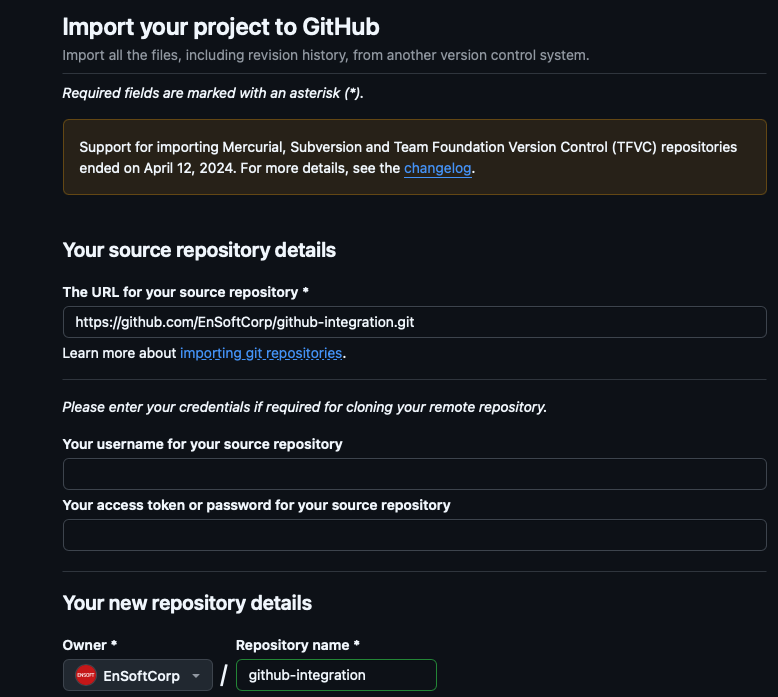
- Begin importをクリックします。リポジトリがインポートされます。
リポジトリには、main と dev の2つのブランチがあります。main ブランチには aero_radmod.slx と、.github/workflows 内にあってワークフローの実行内容を指定するYAMLファイルがあります。そのYAMLファイルは、ファイルのバージョン間の差分をSimDiffで報告するよう、すでに設定されています。
コンピュータにリポジトリをクローンする
同じGitリポジトリをローカルのWindows PCにクローンします。クローン用のURLは、CodeタブのCodeボタンの下にあります。
git clone git@github.com:##YourRepoURLinGitGitHub用のGit資格情報を設定します。インポート元のサンプルリポジトリではなく、ご自身のGitHubリポジトリをクローンします。
セルフホストランナーを設定して実行する
セルフホストランナーの追加は、GitHubのセルフホストランナーの追加に説明されています。以下の手順は、そのページに従います。
- セルフホストランナーを追加するには、リポジトリのSettingsタブを開きます。左のサイドバーでActionsをクリックし、次にRunnersをクリックします。New self-hosted runnerをクリックします。
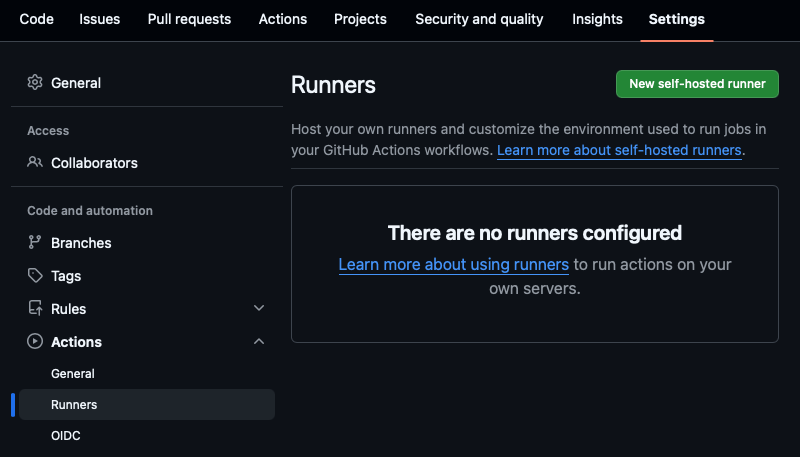
- Add new self-hosted runnerページでWindowsをクリックし、アーキテクチャを選びます(既定はx64です)。そこに表示される手順をWindows PowerShellで実行し、ランナーをダウンロードして設定します。以下に例を示します。
# Create a folder under the drive root
$ mkdir actions-runner; cd actions-runner

# Download the latest runner package
$ Invoke-WebRequest -Uri https://github.com/actions/runner/releases/download/v2.333.1/actions-runner-win-x64-2.333.1.zip
-OutFile actions-runner-win-x64-2.333.1.zip

# Optional: Validate the hash
$ if((Get-FileHash -Path actions-runner-win-x64-2.333.1.zip -Algorithm SHA256).Hash.ToUpper()
  -ne 'd0c4fcb91f8f0754d478db5d61db533bba14cad6c4676a9b93c0b7c2a3969aa0'.ToUpper()){ throw 'Computed checksum did not match' }

# Extract the installer
$ Add-Type -AssemblyName System.IO.Compression.FileSystem ; [System.IO.Compression.ZipFile]::ExtractToDirectory("$PWD/actions-runner-win-x64-2.333.1.zip", "$PWD")- GitHubが表示するコマンドで、ランナーを設定して実行します。以下に例を示します。
 Create the runner and start the configuration experience
$ ./config.cmd --url https://github.com/nikhilranade/##YourRepoURLinGit --token Token

# Run it!
$ ./run.cmd
Gitで変更をプッシュする
ランナーを設定したら、以下の項目を確認し、変更をプッシュしてGitHub Actionを起動します。
SimDiff Automationのインストールを確認します。 YAMLファイルは、SimDiff Automationが C:\Program Files\EnSoft\SimDiff Automation にインストールされている前提です。そうでない場合は、YAMLファイル内のその場所を変更します。
SimDiff Automationを設定します。 sd4.exe を -license および -matlabSetup コマンドラインオプション付きで実行し、ライセンスとMATLABのインストールを設定します。その後、コマンドラインからレポートを生成できることを確認します。
YAMLファイルを確認します。 このサンプルは、SimDiffを起動してピアレビューファイルを生成します。aero_radmod.slx への変更がプッシュされると、ワークフローがレポートを生成してアップロードします。後の節では、変更されたすべてのモデルファイルについてレポートが生成されるよう、これを拡張します。
#Generate Peer Review File
name: SimDiff Peer Review File Generation

on:
push:
  branches:
    - '**'   # all branches
pull_request:

jobs:
simdiff_peer_review:
  name: Generate SimDiff Peer Review File
  runs-on: self-hosted   # your Windows self-hosted runner

  steps:
    - name: Checkout repository
      uses: actions/checkout@v4
      with:
        fetch-depth: 2

    # ============ Set up DiffTool ===============
    - name: Prepare SimDiff command
      shell: 'powershell -ExecutionPolicy Bypass -File {0}'
      run: |
        git config --local difftool.simdiff.cmd '\"C:/Program Files/EnSoft/SimDiff Automation/sd4.exe\" -l \"$LOCAL\" -r \"$REMOTE\" -export aero_radmod_peerreview.html'

    # ============ Invoke SimDiff ===============
    - name: Run SimDiff comparison
      shell: 'powershell -ExecutionPolicy Bypass -File {0}'
      run: |
        Write-Host "Comparing with SimDiff..."
        git difftool -y -t simdiff HEAD~1 HEAD .\aero_radmod.slx

    # ============ Publish Artifact ===============
    - name: Upload SimDiff Peer Review File
      uses: actions/upload-artifact@v4
      with:
        name: aero_radmod_peerreview
        path: aero_radmod_peerreview.html
モデルファイルを変更してプッシュします。 aero_radmod.slx を変更し、コミットして、プッシュします。
これでGitHub Actionが開始します。ローカルPC上のセルフホストランナーがSimDiffのピアレビューファイルを生成し、GitHubにアーティファクトとしてアップロードします。
GitHubでレポートのアーティファクトを確認する
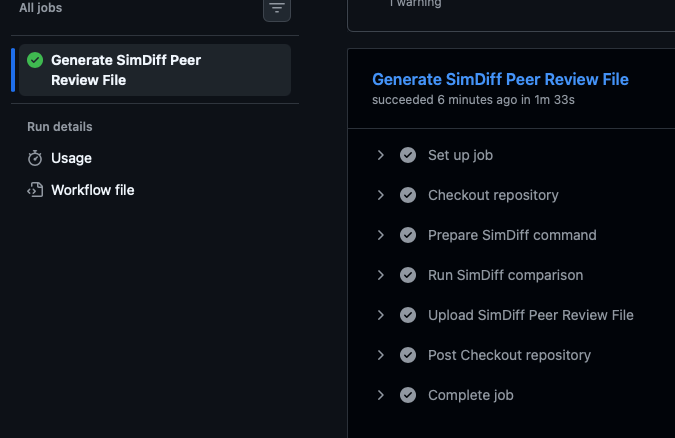
- ActionsのAll workflowsへ移動します。最新の実行を開き、下部のArtifactsセクションへ移動します。ピアレビューファイルをクリックしてダウンロードします。

- ジョブをクリックして詳細を表示します。
コミット内の変更されたすべてのモデルファイルを比較する
前の例は、aero_radmod.slx という名前のファイルが変更される前提でした。コミット内で変更されたすべてのモデルファイルを報告するには、Pythonスクリプトを呼び出すようにYAMLファイルを変更します。モデルファイルを変更するプッシュを行うと、変更されたファイルごとにレポートが作成され、レポートがアーティファクトとしてアップロードされます。サンプルスクリプトは、ファイルの現在のバージョン(HEAD)を、直前のコミットのバージョンと比較します。
前提条件
上記の前提条件に加えて、ローカルマシンにPythonをインストールします。更新されたファイルを確認するには、サンプルリポジトリの dev ブランチに切り替えます。
リポジトリの変更
dev ブランチには、.github/workflows 内に、新しいPythonスクリプトを呼び出す変更済みのYAMLファイルがあります。
更新後のYAML:
#Generate Peer Review File
name: SimDiff Peer Review File Generation

on:
push:
  branches:
    - '**'   # all branches
pull_request:

jobs:
simdiff_peer_review:
  name: Generate SimDiff Peer Review File
  runs-on: self-hosted   # your Windows self-hosted runner

  steps:
    - name: Checkout repository
      uses: actions/checkout@v4
      with:
        fetch-depth: 2


    # ============ Invoke SimDiff ===============
    - name: Run SimDiff comparison
      shell: 'powershell -ExecutionPolicy Bypass -File {0}'
      run: |
        Write-Host "Comparing with SimDiff..."
        python .\diff.py reports HEAD~1 HEAD

    # ============ Publish Artifact ===============
    - name: Upload SimDiff Peer Review File
      uses: actions/upload-artifact@v4
      with:
        name: simdiff peer review files
        path: reports
Pythonスクリプト。 diff.py の内容を以下に示します。
import subprocess
import os
import sys

# Function to get the list of modified files in the commit
def get_modified_files():
 try:
     # Get the list of modified files (slx files) in the current commit
     result = subprocess.run(['git', 'diff', commit1, commit2, '--name-only', '--diff-filter=M'], stdout=subprocess.PIPE,
                             text=True,      # Ensure output is in string format
                             check=True)     # Raise an error if the command fails
     # Filter to include only Simulink model files (.slx or .mdl)
     modified_files = [line for line in result.stdout.splitlines() if (line.endswith('.slx') or line.endswith('.mdl'))]
     return modified_files
 except subprocess.CalledProcessError as e:
     print(f"Error getting modified files: {e}")
     return []

# Function to call SimDiff for each file
def run_simdiff_for_files(file):
     try:
         # Call the difftool (replace 'simdiff' with the actual command if different)
         report_file = f"{reportsDir}/" + file.removesuffix(".slx") + ".peerreview.html"
         print(f"    report_file= {report_file}")

         # Ensure report directory is created if it doesn't exist
         report_path = os.path.dirname(report_file)
         os.makedirs(report_path, exist_ok=True)

         path_to_diff_tool = f'"\'C:/Program Files/EnSoft/SimDiff Automation/sd4.exe\' -l $LOCAL -r $REMOTE -export {report_file}"'
         config_cmd = f'git config --local difftool.sd4.cmd {path_to_diff_tool}'
         #print(f"    config_cmd= {config_cmd}")
         subprocess.run(config_cmd, text=True, check=True, shell=True)
         diff_cmd = f'git difftool -y -t sd4 {commit1} {commit2} {file}'
         #print(f"    diff_cmd= {diff_cmd}")
         subprocess.run(diff_cmd, text=True, shell=True)

         #print(f"    SimDiff ran successfully for {file}\n")
     except subprocess.CalledProcessError as e:
         print(f"Error running SimDiff on {file}: {e}")

def main():
 modified_files = get_modified_files()
 if modified_files:
     print("Modified Simulink models:")
     for file in modified_files:
         print(f" - {file}")
         run_simdiff_for_files(file)
 else:
     print("No modified Simulink models found.")

if __name__ == '__main__':
 reportsDir = sys.argv[1]
 commit1 = sys.argv[2]
 commit2 = sys.argv[3]
 main()
モデルファイルを変更してプッシュする
変更をプッシュすると、変更されたモデルファイルごとにレポートが作成され、アーティファクトとしてアップロードされます。
メタデータ
生成されるピアレビューファイルにメタデータを含めるには、弊社にお問い合わせ下さい。設定手順は弊社がご提供します。
お問い合わせ
これらの手順についてのご質問: support@ensoftcorp.com。
ご質問、または修正のご希望はありますか?
ありがとうございます。
このページについての内容を受け取りました。