
‹ Unlocking the Power of Atlas
Unlocking the Power of Atlas (5): Control flow and Data flow
Control flow and data flow are stored when Atlas indexes a codebase, and a few queries retrieve either one.
In earlier articles, we began by learning how to import a codebase in Atlas, we delved into Smart Views and Atlas Shell, and explored the Atlas query language. Now, let’s bring these tools to life by applying them to a concrete analysis tasks. We will begin with the foundational analyses — Control flow and Data flow.
Control flow and Data flow are foundational concepts in software analysis, initially introduced by Frances Allen. These concepts are essential for various types of software analysis, helping us understand the behavior and structure of code. With Atlas, extracting this critical information becomes a breeze, and it even provides visually appealing representations to help us better grasp the insights. Let’s dive into how Atlas simplifies this process and makes these analyses even more powerful.
Control Flow in Atlas
When you index a codebase in Atlas, it automatically creates and stores the Control Flow information for the entire software. For a step-by-step guide on how to index a codebase in Atlas, check out our previous article.
Atlas generates a node for every program statement in your codebase. These nodes are categorized under “XCSG.ControlFlow_Node” within the Atlas graph database. This means that if you run the query G.nodes(XCSG.ControlFlow_Node), you’ll get a list of all the control flow nodes present in a given graph G. It’s a simple yet powerful way to visualize and manipulate the structure of your software’s control flow.
Control flow information is about the successor relation propose by Allen. It defines what statement(s) execute next given a statement. Atlas represents it using edges between control flow nodes. These edges are categorized as “XCSG.ControlFlow_Edge”.
When analyzing control flow, you’re typically focused on a specific function or method. Fortunately, Atlas makes it easy to retrieve this information with just a few queries. Here’s how you can do it:
var f = functions(<name>)
var g = cfg(f)
show(f)
Additionally, to do this on the fly, Atlas also comes equipped with a smart view for Control flow analysis. (see our article on smart views).
Data Flow in Atlas
Similar to Control Flow, Atlas also computes Data Flow relationships when you index a codebase. The graph database keys for the nodes and edges involved in Data Flow are XCSG.DataFlow_Node and XCSG.DataFlow_Edge, respectively.
Atlas goes a step further by offering a smart view that allows for convenient, on-the-fly Data Flow analysis. This feature makes it easier to explore how data moves through your code, helping you gain deeper insights with minimal effort.
In many cases, it’s crucial to establish a correspondence between Control Flow and Data Flow information. Atlas makes this possible by organizing both control and data flow within a container relationship, creating a seamless connection between the two. Each variable is represented as a Data flow node To illustrate how this works in practice, let’s take a closer look at how Atlas manages these relationships and how it can enhance your analysis.
For example, in the program statement percussion = instruments + i + 1; Atlas will represent the data flow nodes corresponding to the variables are “contained” within the control flow node corresponding to the program statement. See figure below.
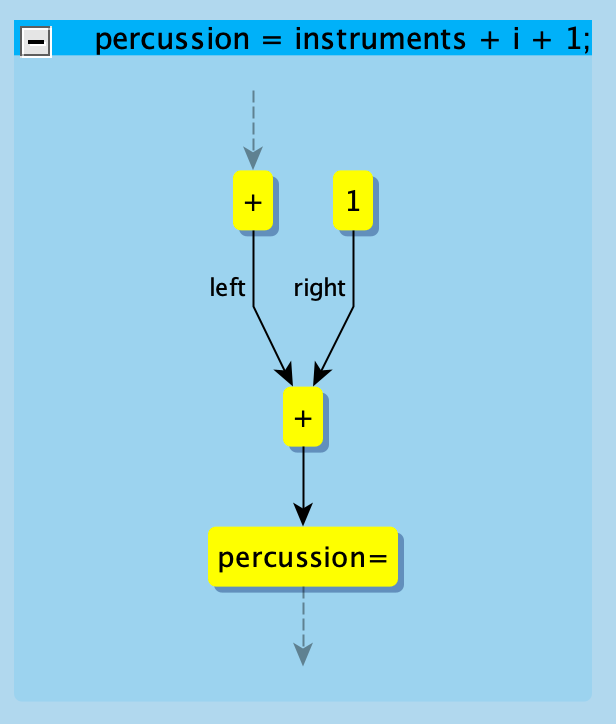
The control flow node are likewise contained in a function node. The query children()gets nodes directly contained within a node — for a function node it returns control flow nodes within a function node and for a control flow node it returns the data flow nodes contained within. Note that, data flow nodes that represent global variable definitions are not contained within a program statement.
Atlas organizes Control Flow and Data Flow in a highly flexible way, making it easy to perform more advanced analyses using its powerful query language. This flexibility has allowed us to build custom analyzers for tasks like loop detection, slicing, and identifying code smells for DARPA projects. Building a personalized analysis toolbox with Atlas’s Control Flow and Data Flow is an exciting topic, and we’re eager to explore it in detail in an upcoming article. Stay tuned for an in-depth dive into how you can leverage Atlas to create tailored tools for your own analysis needs.
Next: Call Graphs
Have a question or want us to fix something?
Thank you.
We have your note about this page.