
Worklist
The Modelify Worklist view, every worklist item type and code with its cause and recommended solution, and the known conversion limitations.
6 Modelify Worklist View
This view lists worklist items created by Atlas during mapping and Modelify during conversion. Information in this view should help you to perform the required actions to address conversion problems.
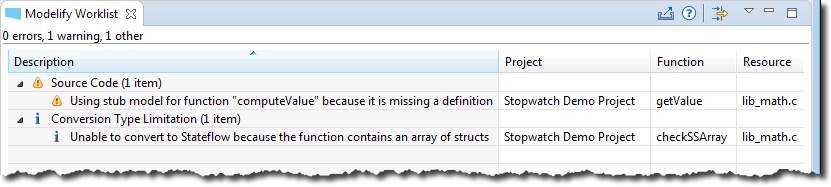
The view includes four columns:
- Description: a short message that describes the problem.
- Project: the project name where the worklist item was created.
- Function: the function name where the worklist item was created.
- Resource: name and extension of the file where the worklist item was created.
For a given worklist item, you can perform the following actions from a context menu:
- Show Details: a short message that describes the problem. See Worklist Item Detail.
- Show function in Conversion page: locate and select function in the Conversion page.
- Show function in Source Code: open source file in the eclipse editor and select the function for the selected worklist item.
- Show Worklist Items for this function: filter view to list only worklist items related to the function associated to the selected worklist item.
Worklist Item Detail
Worklist item details can be seen in a dialog.
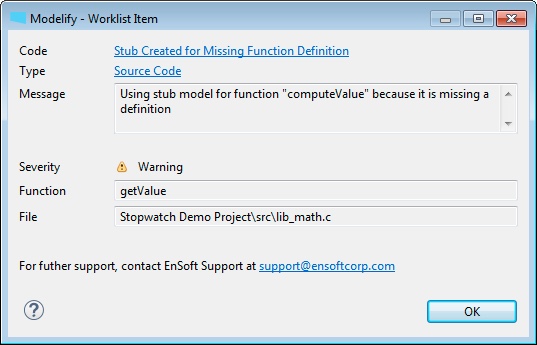
The dialog shows the following information:
- Code: unique descriptive code for the worklist item. It's a link to the corresponding help page for the worklist item code. You can either click that link or the help button at the bottom-left corner to open the corresponding help page. See Worklist Item Help Pages.
- Type: type for the worklist item. You can click the link to open the help page for it. Worklist items are categorized as indicated below.
- Source Code: Atlas identified a problem in the source code (e.g. missing definition).
- Atlas Problem: Atlas found a problem while mapping the codebase.
- Atlas Limitation: Atlas is unable to map a specific C construct.
- Modelify Problem: Modelify found a problem during conversion.
- Modelify Limitation: Modelify is not able to convert a specific C construct.
- MATLAB/Simulink Limitation: conversion cannot be done due to a MATLAB or Simulink toolbox limitation (e.g. recursion cannot be modeled in Simulink).
- Verification: warning or errors while checking whether the generated model simulates.
- Conversion Type Limitation: Modelify does not support conversion of a C construct to a specific conversion type (e.g. a function that indexes an array of structs cannot be converted to Stateflow since Stateflow does not allow bus array indexing).
- Message: a detailed message about the worklist item. It might include warning/error messages generated by MATLAB/Simulink.
- Severity: the severity of the worklist item. Possible values are Error, Warning, and Information.
- Function: the function name associated with the worklist item.
- File: full path relative to project root for file associated with the worklist item.
Worklist Item Help Pages
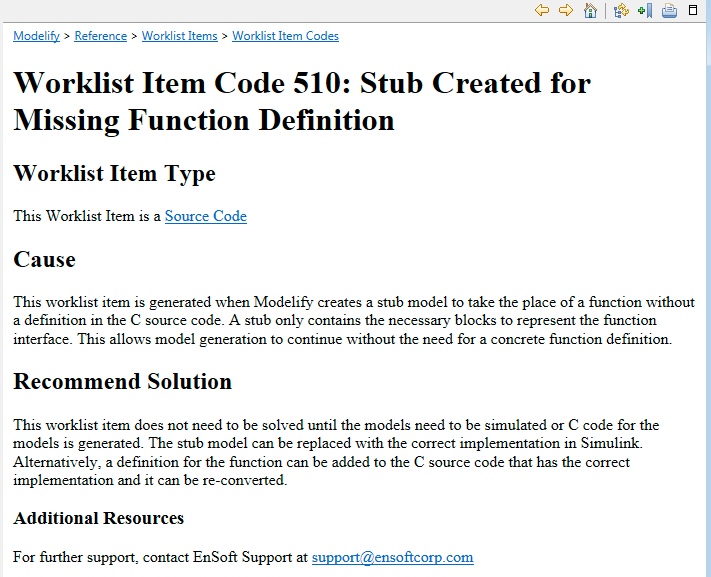
There is a help page for each worklist item which can be accessed directly from the Worklist Item Detail dialog. The help page provides details about the cause for the worklist item as well as a recommended solution or workaround for it.
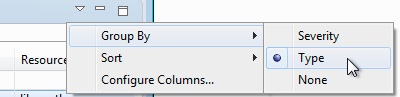
The items in the Modelify Worklist view can be sorted by any column and grouped according to severity or type of worklist item.
7 Worklist Item Types
Worklist Item Type: Source Code
This Worklist Item Type is used to categorize worklist items that refer to some missing code in the C source code. In most cases, the only way to fix a worklist item of this type is to add or fix code in the code base.
Additional Resources
For further support, contact EnSoft Support at support@ensoftcorp.com
Worklist Item Type: Atlas Problem
This Worklist Item Type is used to categorize worklist items that represent a problem found by Atlas during code mapping.
Additional Resources
For further support, contact EnSoft Support at support@ensoftcorp.com
Worklist Item Type: Atlas Limitation
This Worklist Item Type is used to categorize worklist items that refer to C code that Atlas for C does not fully support.
Additional Resources
For further support, contact EnSoft Support at support@ensoftcorp.com
Worklist Item Type: Modelify Problem
This Worklist Item Type is used to categorize worklist items that represent an unexpected problem that occurred during Modelify conversion.
Additional Resources
For further support, contact EnSoft Support at support@ensoftcorp.com
Worklist Item Type: Modelify Limitation
This Worklist Item Type is used to categorize worklist items that refer to C code that Modelify does not fully support.
Additional Resources
For further support, contact EnSoft Support at support@ensoftcorp.com
Worklist Item Type: MATLAB/Simulink Limitation
This Worklist Item Type is used to categorize worklist items that refer to C code that MATLAB or Simulink does not support.
Additional Resources
For further support, contact EnSoft Support at support@ensoftcorp.com
Worklist Item Type: Verification
This Worklist Item Type is used to categorize worklist items that represent information gathered to verify the converted model. This is most commonly gathered when running the Diagram Update operation in MATLAB to detect compilation errors.
Additional Resources
For further support, contact EnSoft Support at support@ensoftcorp.com
Worklist Item Type: Conversion Type Limitation
This Worklist Item Type is used to categorize worklist items that explain why a C function can not be converted to Simulink or Stateflow.
Additional Resources
For further support, contact EnSoft Support at support@ensoftcorp.com
Worklist Item Type: Configuration Problem
This Worklist Item Type is used to categorize worklist items that represent a problem with the Modelify project configuration.
Additional Resources
For further support, contact EnSoft Support at support@ensoftcorp.com
8 Worklist Item Codes
Worklist Item Code 501: Simulink Loops
Worklist Item Type
This Worklist Item is a Conversion Type Limitation
Cause
Modelify's Simulink conversion does not yet support the conversion of loops in C source code.
Recommend Solution
The function can either be converted to Stateflow or the loop can be extracted into another function to be converted to Stateflow.
Additional Resources
For further support, contact EnSoft Support at support@ensoftcorp.com
Worklist Item Code 502: Simulink Goto
Worklist Item Type
This Worklist Item is a Conversion Type Limitation
Cause
Modelify's Simulink conversion does not support the conversion of "goto" statements in C source code.
Recommend Solution
Modelify's Stateflow conversion does support "goto" statements. The function can be converted to Stateflow or the control flow logic can be changed to not use a "goto" statement.
Additional Resources
For further support, contact EnSoft Support at support@ensoftcorp.com
Worklist Item Code 503: Stateflow Bus Vector
Worklist Item Type
This Worklist Item is a Conversion Type Limitation
Cause
Stateflow action language does not support an array of Busses. For more information refer to the following MATLAB documentation page.
Recommend Solution
The function can be converted to Simulink instead. If the function contains a loop, the loop will need to be extracted to a separate function since Simulink conversion does not yet support loops (see Simulink Loops).
Additional Resources
For further support, contact EnSoft Support at support@ensoftcorp.com
Worklist Item Code 504: Diagram Update Warning
Worklist Item Type
This Worklist Item is a Verification
Cause
This worklist item represents a Warning reported by MATLAB when Modelify performed the Diagram Update action.
Recommend Solution
The solution for this worklist item depends on the Warning message from MATLAB. If the solution is not clear, contact EnSoft Support for assistance.
Additional Resources
For further support, contact EnSoft Support at support@ensoftcorp.com
Worklist Item Code 505: Diagram Update Error
Worklist Item Type
This Worklist Item is a Verification
Cause
This worklist item represents a Error reported by MATLAB when Modelify performed the Diagram Update action.
Recommend Solution
The solution for this worklist item depends on the Error message from MATLAB. If the solution is not clear, contact EnSoft Support for assistance.
Additional Resources
For further support, contact EnSoft Support at support@ensoftcorp.com
Worklist Item Code 506: Partial Modelify Error
Worklist Item Type
This Worklist Item is a Modelify Problem
Cause
This worklist item represents an unexpected problem that occurred during Modelify's conversion of the function. A model should still have been created and will be at least a partial conversion.
Recommend Solution
Please report this error to EnSoft Support at the email address below.
Additional Resources
For further support, contact EnSoft Support at support@ensoftcorp.com
Worklist Item Code 507: Atlas Error Node
Worklist Item Type
This Worklist Item is a Atlas Problem
Cause
This worklist item is created when Atlas found a problem during mapping. This can happen due to an error that occurred during Atlas's code map process or it can be an error from the source code.
Recommend Solution
Please check the source code for compile errors in the corresponding function. If there are compile errors, fix them, re-map the project and re-convert. Otherwise, report this problem to EnSoft Support at the email address below.
Additional Resources
For further support, contact EnSoft Support at support@ensoftcorp.com
Worklist Item Code 508: Undefined Function Return Type
Worklist Item Type
This Worklist Item is a Source Code
Cause
This worklist item is created when the C code calls an undefined function and Modelify is unable to determine the return type of the function.
Recommend Solution
Add a function definition or declaration to the C source code. This will explicitly declare the return type of the function and allow Modelify to create an accurate conversion.
Additional Resources
For further support, contact EnSoft Support at support@ensoftcorp.com
Worklist Item Code 509: Missing Block Port
Worklist Item Type
This Worklist Item is a Modelify Problem
Cause
This worklist item is generated when Modelify attempts to create a line to a block's port but the port does not exist. This occurs most often when converting a C function call to a Model Reference block and the model being referenced does not have the expected number of Inports or Outports.
Recommend Solution
Re-converting the function for the model that is being referenced can help Modelify and MATLAB to have the same expected ports.
Additional Resources
For further support, contact EnSoft Support at support@ensoftcorp.com
Worklist Item Code 510: Stub Created for Missing Function Definition
Worklist Item Type
This Worklist Item is a Source Code
Cause
This worklist item is generated when Modelify creates a stub model to take the place of a function without a definition in the C source code. A stub only contains the necessary blocks to represent the function interface. This allows model generation to continue without the need for a concrete function definition.
Recommend Solution
This worklist item does not need to be solved until the models need to be simulated or C code for the models is generated. The stub model can be replaced with the correct implementation in Simulink. Alternatively, a definition for the function can be added to the C source code that has the correct implementation and it can be re-converted.
Additional Resources
For further support, contact EnSoft Support at support@ensoftcorp.com
Worklist Item Code 511: Unexpected MATLAB Error
Worklist Item Type
This Worklist Item is a Modelify Problem
Cause
This worklist item represents an error reported by MATLAB during conversion.
Recommend Solution
Please report this error to EnSoft Support at the email address below.
Additional Resources
For further support, contact EnSoft Support at support@ensoftcorp.com
Worklist Item Code 512: Unexpected Error
Worklist Item Type
This Worklist Item is a Modelify Problem
Cause
This worklist item represents an unexpected problem that occurred during conversion.
Recommend Solution
Please report this error to EnSoft Support at the email address below.
Additional Resources
For further support, contact EnSoft Support at support@ensoftcorp.com
Worklist Item Code 513: Missing Expected Atlas Element
Worklist Item Type
This Worklist Item is a Atlas Problem
Cause
This occurs when the Atlas Code Map is missing an expected Node or Edge.
Recommend Solution
Please check the source code for compile errors in the corresponding function. If there are compile errors, fix them, re-map the project and re-convert. Otherwise, report this problem to EnSoft Support at the email address below.
Additional Resources
For further support, contact EnSoft Support at support@ensoftcorp.com
Worklist Item Code 514: Void Data Type
Worklist Item Type
This Worklist Item is a Modelify Limitation
Cause
Modelify does not support a void or void pointer data type. The void data type is only supported for parameters and function return.
Recommend Solution
The function can either be converted to an S-Function or the C code can be update to avoid that code construct.
Additional Resources
For further support, contact EnSoft Support at support@ensoftcorp.com
Worklist Item Code 515: Function Pointer Type
Worklist Item Type
This Worklist Item is a Modelify Limitation
Cause
Modelify does not support a function pointer data type.
Recommend Solution
Modelify can convert the function that is pointed to but the user needs to determine how/when the converted function will be called.
Additional Resources
For further support, contact EnSoft Support at support@ensoftcorp.com
Worklist Item Code 516: Unsupported Primitive Type
Worklist Item Type
This Worklist Item is a Modelify Limitation
Cause
This occurs if the C source code uses a primitive type that is not supported by MATLAB.
Recommend Solution
Please report this problem to EnSoft Support at the email address below.
Additional Resources
For further support, contact EnSoft Support at support@ensoftcorp.com
Worklist Item Code 517: Recursive Data Type
Worklist Item Type
This Worklist Item is a MATLAB/Simulink Limitation
Cause
Simulink does not support recursive data types like Linked Lists.
Recommend Solution
Refactor the recursive type to use an array of finite size.
Additional Resources
For further support, contact EnSoft Support at support@ensoftcorp.com
Worklist Item Code 518: Recursive Function
Worklist Item Type
This Worklist Item is a MATLAB/Simulink Limitation
Cause
Recursive functions cannot be converted to Simulink or Stateflow since a model reference loop will be created and that's not supported by Simulink.
Recommend Solution
You can convert the function to an S-Function or choose not to convert it, in which case a stub model will be created if it's called by another function. Another solution is to refactor the function to use loop based control flow.
Additional Resources
For further support, contact EnSoft Support at support@ensoftcorp.com
Worklist Item Code 519: Missing Function Definition
Worklist Item Type
This Worklist Item is a Source Code
Cause
This occurs during Modelify conversion if a call is made to a function without a definition in the C source code and when the option "Create stub block diagrams for undefined functions" is disabled.
Recommend Solution
Enable the option "Create stub block diagrams for undefined functions" if you would like Modelify to automatically create a stub model for the missing function. A stub only contains the necessary blocks to represent the function interface. This allows model generation to continue without the need for a concrete function definition.
Additional Resources
For further support, contact EnSoft Support at support@ensoftcorp.com
Worklist Item Code 520: Changing Global Pointer Address
Worklist Item Type
This Worklist Item is a Modelify Limitation
Cause
This occurs when a function attempts to iterate over a global pointer variable by incrementing the variable. This is not supported because it would shift the location of the global pointer variable.
Recommend Solution
This item can be resolved by refactoring the code to iterate over the global variable using a temporary variable instead of the global variable.
Additional Resources
For further support, contact EnSoft Support at support@ensoftcorp.com
Worklist Item Code 521: Changing Static Pointer Address
Worklist Item Type
This Worklist Item is a Modelify Limitation
Cause
This occurs when a function attempts to iterate over a static local pointer variable by incrementing the variable. This is not supported because it would shift the location and static local pointer variable.
Recommend Solution
This item can be resolved by refactoring the code to iterate over the static local variable using a temporary variable instead of the static local variable.
Additional Resources
For further support, contact EnSoft Support at support@ensoftcorp.com
Worklist Item Code 522: Graph Too Large
Worklist Item Type
This Worklist Item is a Modelify Limitation
Cause
This worklist item is created when a system (top system, subsystem or Chart) in the generated model has more than 2000 elements (blocks or junctions) at the same level. This situation will, in most cases, cause the layout algorithm to run out of memory.
Recommend Solution
The easiest way to reduce the size of a system is to enable as many Reductions as possible. Another solution is to refactor the function into smaller functions.
Additional Resources
For further support, contact EnSoft Support at support@ensoftcorp.com
Worklist Item Code 523: Incorrect Data Type
Worklist Item Type
This Worklist Item is a Modelify Problem
Cause
This worklist item is created when Modelify determines that the wrong data type is being used for an operation that requires a specific data type. A common example is when an array access operation is performed on a variable that is not an array.
Recommend Solution
The solution for this worklist item depends on the expected data type, which should be given in the worklist item message. Fixing this problem will require verifying that the source code is correct and that the operation and variable type match.
Additional Resources
For further support, contact EnSoft Support at support@ensoftcorp.com
Worklist Item Code 524: Unsupported Offset Variable
Worklist Item Type
This Worklist Item is a Modelify Limitation
Cause
This occurs when Modelify's Stateflow conversion attempts to create an offset variable for a global or static local pointer variable. An offset variable is used when iterating over a pointer starting from the pointer's base address. The offset variable is much like an index variable of an array access. This is not supported for global or static local variables because it would change the variables address. See Changing Global Pointer Address and Changing Static Pointer Address for more information.
Recommend Solution
Refactor the code to iterate over the pointer using a local variable instead of the global or static local variable directly. This will allow the Stateflow conversion to use the local variable as the offset variable.
Additional Resources
For further support, contact EnSoft Support at support@ensoftcorp.com
Worklist Item Code 525: Initialization File Pointer Offset
Worklist Item Type
This Worklist Item is a Modelify Limitation
Cause
This can occur if Modelify attempts to create a MATLAB expression in the initialization file (M-script or Data Dictionary) for code that is iterating over an array using a pointer. This kind of construct is not currently supported by Modelify.
Recommend Solution
This can be resolved by refactoring the code to not iterate over an array using a pointer during initialization. One possible workaround is to include that initialization code in a new function.
Additional Resources
For further support, contact EnSoft Support at support@ensoftcorp.com
Worklist Item Code 526: Unsupported Literal Address
Worklist Item Type
This Worklist Item is a Modelify Limitation
Cause
This can occur if Modelify attempts to create a MATLAB expression in the initialization file (M-script or Data Dictionary) for a pointer variable which uses a literal memory address. Literal memory addresses are not supported in the initialization file because there is no function to access the memory in MATLAB.
Recommend Solution
This item can often be resolved by refactoring the code to point to a global variable instead of to a literal memory address.
Additional Resources
For further support, contact EnSoft Support at support@ensoftcorp.com
Worklist Item Code 527: Pointer Ternary Condition
Worklist Item Type
This Worklist Item is a Modelify Limitation
Cause
This worklist item is created when a ternary operator is used during the assignment of a pointer address. Modelify does not support the use of ternary operators in this case.
Recommend Solution
This worklist item can be resolved by replacing the ternary operator with an if-else statement that performs the same assignment.
Additional Resources
For further support, contact EnSoft Support at support@ensoftcorp.com
Worklist Item Code 528: Resolving Dereferenced Edges
Worklist Item Type
This Worklist Item is a Modelify Limitation
Cause
This occurs when Modelify's Stateflow conversion is unable to determine the address for a pointer variable. This most often happens when a pointer's address is changed in control flow (an if-else statement) and so could have multiple possible values when the pointer is later used. This pattern is not yet supported by Modelify.
Recommend Solution
This can be solved by refactoring the code so that there is only a single possible value for a pointer when it is accessed.
Additional Resources
For further support, contact EnSoft Support at support@ensoftcorp.com
Worklist Item Code 529: Unsupported Pointer Expression
Worklist Item Type
This Worklist Item is a Modelify Limitation
Cause
This can occur when a pointer is created for the address of an expression that Modelify is not able to recreate in Stateflow.
Recommend Solution
Try rewriting the pointer expression or address of expression so that Atlas and Modelify can better understand what operation is being performed. Contact EnSoft Support at the email below for further support.
Additional Resources
For further support, contact EnSoft Support at support@ensoftcorp.com
Worklist Item Code 530: Unsupported Pointer Write
Worklist Item Type
This Worklist Item is a Modelify Limitation
Cause
This occurs when Modelify is unable to determine the pointer variable that is being assigned or if the variable being used is not a pointer variable.
Recommend Solution
This item can be resolved by simplifying or re-writing the pointer assignment. If the variable being assigned is not a pointer variable, it should be changed to be a pointer.
Additional Resources
For further support, contact EnSoft Support at support@ensoftcorp.com
Worklist Item Code 531: Unsupported Switch Format
Worklist Item Type
This Worklist Item is a Modelify Limitation
Cause
This worklist item is created when a local variable is declared in a switch statement before the case statements.
Recommend Solution
This worklist item can be solved by moving the local variable declaration to before the switch statement instead of inside the switch statement.
Additional Resources
For further support, contact EnSoft Support at support@ensoftcorp.com
Worklist Item Code 532: Unsupported Cast Type
Worklist Item Type
This Worklist Item is a MATLAB/Simulink Limitation
Cause
This worklist item is created when the C source code includes a cast operation of a type that is not supported by the Stateflow action language. The Stateflow action language only supports casts of the MATLAB primitive types.
Recommend Solution
In most cases it should be possible to remove the need for the cast. This will, of course, depend on the function.
Additional Resources
For further support, contact EnSoft Support at support@ensoftcorp.com
Worklist Item Code 533: Unsupported Static Local Pointer Initialization
Worklist Item Type
This Worklist Item is a Modelify Limitation
Cause
This occurs when Modelify is unable to create a MATLAB expression in the initialization file (M-script or Data Dictionary) equivalent for the static local pointer initialization. The initialization needs to be constructed as a MATLAB expression in order to initialize the Stateflow variable.
Recommend Solution
This item can be solved by simplifying the static local pointer initialization or by refactoring the code so that the static local variable is not a pointer or so that the function does not use a static local variable. Contact EnSoft Support at the email below for further support.
Additional Resources
For further support, contact EnSoft Support at support@ensoftcorp.com
Worklist Item Code 534: Union Multiple Fields
Worklist Item Type
This Worklist Item is a Modelify Limitation
Cause
This worklist item is created when multiple fields of a Union are being accessed in the C code. Model logic might not be correct since a Simulink Bus was created for the union.
Recommend Solution
Refactor the code so that a single field of the union is used.
Additional Resources
For further support, contact EnSoft Support at support@ensoftcorp.com
Worklist Item Code 535: S-Function Unsupported 3-or-more Dimensional Array
Worklist Item Type
This Worklist Item is a Modelify Limitation
Cause
Modelify's S-Function conversion does not support signals with 3 or more dimensions.
Recommend Solution
Refactor the function so that arguments don't have signals with 3 or more dimensions or choose a different conversion type if possible.
Additional Resources
For further support, contact EnSoft Support at support@ensoftcorp.com
Worklist Item Code 536: Unsupported Ternary Operator
Worklist Item Type
This Worklist Item is a Modelify Limitation
Cause
This occurs when Modelify attempts to create a MATLAB expression in the initialization file (M-script or Data Dictionary) for a ternary operator. It occurs when the ternary operator is used during initialization of constants or static local variables.
Recommend Solution
Refactor the code so that the ternary operator does not appear in this type of initialization.
Additional Resources
For further support, contact EnSoft Support at support@ensoftcorp.com
Worklist Item Code 537: Initialize Non Constant Global
Worklist Item Type
This Worklist Item is a MATLAB/Simulink Limitation
Cause
This can occur if Modelify attempts to create a MATLAB expression in the initialization file (M-script or Data Dictionary) with the value of a global variable that is not constant. This is not possible because the global variable value is routed through models as a signal and not as a MATLAB expression.
Recommend Solution
This can be resolved by refactoring the code to not use the global variable in this location or to make the global variable constant.
Additional Resources
For further support, contact EnSoft Support at support@ensoftcorp.com
Worklist Item Code 538: Stub Created for large function
Worklist Item Type
This Worklist Item is a Modelify Limitation
Cause
A stub model is created when Modelify is unable to perform the conversion due to some internal conversion problem.
Recommend Solution
Please, contact EnSoft Support at the email below for assistance.
Additional Resources
For further support, contact EnSoft Support at support@ensoftcorp.com
Worklist Item Code 539: Failed to Create Library Block
Worklist Item Type
This Worklist Item is a Configuration Problem
Cause
This occurs when Modelify attempts to create a link to a Library block but fails to find the Library model file or the file does not contain a subsystem with the target name. This most often happens when a Library Mapping is created to a Custom User Library but the Library file has been moved or edited.
Recommend Solution
The Worklist Item message should give the path and/or name of the Library model that Modelify is trying to use. Ensure that this Library model does exist and that the subsystem name within the Library is correct.
Additional Resources
For further support, contact EnSoft Support at support@ensoftcorp.com
Worklist Item Code 540: Ignored Function Call
Worklist Item Type
This Worklist Item is a Modelify Limitation
Cause
This occurs when Modelify is converting a function that calls a standard C function that can not be supported in Simulink. The most common examples of this are calls to the C functions "printf", "sprintf", and "fprintf". These functions are not supported because Simulink does not support String signals.
Recommend Solution
If the function call that was not converted is only used for debugging, there is nothing that needs to be done. If the function call is important for the correctness of the code, it is necessary to create a custom C function with the same name that can be converted to a Simulink model. This model will then be referenced for the function call.
Additional Resources
For further support, contact EnSoft Support at support@ensoftcorp.com
Worklist Item Code 541: Simulink Switch with Declaration
Worklist Item Type
This Worklist Item is a Conversion Type Limitation
Cause
Modelify's conversion does not yet support declarations between the switch statement and the first case label in C source code.
Recommend Solution
The declarations can be moved prior to the switch statement, taking care to note that initializations of such declarations were idempotent.
Additional Resources
For further support, contact EnSoft Support at support@ensoftcorp.com
Worklist Item Code 542: Switch With Multiple Enums
Worklist Item Type
This Worklist Item is a MATLAB/Simulink Limitation
Cause
MATLAB does not support creating a MultiportSwitch block with values from different enumerations. This code occurs when the C code contains a switch statement with enumerators from different enums. This is valid C code but is not valid in MATLAB.
Recommend Solution
This can be resolved by changing the switch statement to use enumerators from a single enum or by replacing the switch statement with if-else statements.
Additional Resources
For further support, contact EnSoft Support at support@ensoftcorp.com
Worklist Item Code 543: Unknown Multidimensional Inport
Worklist Item Type
This Worklist Item is a Source Code
Cause
This occurs when Modelify attempts to convert a C parameter or global that has multiple dimensions and at least one of the dimension lengths can not be determined. Simulink supports having ports with inherited dimension but does not allow these ports to be of multiple dimensions.
Recommend Solution
This can be resolved by giving more information in the C code to help Modelify determine the dimension sizes of the parameter or global variable. This can usually be done by adding the length of the array if it is an array. It may be necessary to refactor a pointer to an array to resolve this issue.
Additional Resources
For further support, contact EnSoft Support at support@ensoftcorp.com
Worklist Item Code 544: Name Conflicts with MATLAB Function or Keyword
Worklist Item Type
This Worklist Item is a MATLAB/Simulink Limitation
Cause
Modelify will automatically change the name of a model generated for a C function that conflicts with a MATLAB function or keyword. Examples of MATLAB functions are "strcmp" and "sprintf". A list of many of the reserved keywords can be found at https://www.mathworks.com/help/matlab/ref/iskeyword.html.
Recommend Solution
No change is necessary because Modelify automatically changes the model name to not conflict. The C function name can be changed if a name other than the one generated by Modelify is desired.
Additional Resources
For further support, contact EnSoft Support at support@ensoftcorp.com
Worklist Item Code 545: Unsupported case of Increment/Decrement operator
Worklist Item Type
This Worklist Item is a Modelify Limitation
Cause
This occurs when there is an Increment/Decrement operator on a global, a struct field or an array component and another read/write in the same expression. This kind of expression could produce undefined behavior in C code and it might not be properly converted to Stateflow.
Recommend Solution
This can be resolved by updating the source code so that there is no extra read/write in the same expression if there is an Increment/Decrement operator.
Additional Resources
For further support, contact EnSoft Support at support@ensoftcorp.com
Worklist Item Code 546: Unable to Resolve Library Mapping
Worklist Item Type
This Worklist Item is a Configuration Problem
Cause
This occurs when Modelify attempts to use a Library Mapping rule to replace a C function call with a Simulink block but is unable to apply one of the port mappings.
Recommend Solution
This can be resolved by check the Library Mapping rule for the C function in the Library Mapping configuration page. Check that the port names used in the port mappings are valid for the C function.
Additional Resources
For further support, contact EnSoft Support at support@ensoftcorp.com
Worklist Item Code 547: Potential Dead Code
Worklist Item Type
This Worklist Item is a Source Code
Cause
This worklist item is created when Modelify determines that a C statement could be dead code.
Recommend Solution
It is not mandatory to address this issue. However, if desired, this can be resolved by eliminating the dead code in the C file. Make sure to re-map after changing C source files.
Additional Resources
For further support, contact EnSoft Support at support@ensoftcorp.com
Worklist Item Code 548: Unsupported MATLAB Built-in Type
Worklist Item Type
This Worklist Item is a MATLAB/Simulink Limitation
Cause
This occurs if the C source code uses a primitive type that is supported by MATLAB but it is not supported by Simulink.
Recommend Solution
This can be resolved by updating the source code so that it uses data types that are supported in Simulink.
Additional Resources
For further support, contact EnSoft Support at support@ensoftcorp.com
Worklist Item Code 549: Unsupported S-Function Port Matrix Signal
Worklist Item Type
This Worklist Item is a Modelify Limitation
Cause
Modelify's S-Function conversion does not fully support matrix signals for S-Function ports yet.
Recommend Solution
This limitation can be resolved be inserting a Reshape block and set the output dimensions parameter accordingly.
Additional Resources
For further support, contact EnSoft Support at support@ensoftcorp.com
Worklist Item Code 550: Unable to find Atlas node
Worklist Item Type
This Worklist Item is a Modelify Problem
Cause
Modelify was unable to find the corresponding Atlas Node for a Conversion Element (e.g. Function). A possible cause could be a complex function signature that includes some unsupported features in Modelify.
Recommend Solution
Please report this problem to EnSoft Support at the email address below.
Additional Resources
For further support, contact EnSoft Support at support@ensoftcorp.com
Worklist Item Code 551: Stub Created for C library function
Worklist Item Type
This Worklist Item is a Modelify Limitation
Cause
This worklist item is generated when Modelify creates a stub model for a C library function that Modelify does not know how to model in Simulink/Stateflow. A stub only contains the necessary blocks to represent the function interface. This allows model generation to continue without the need for proper handling of a C feature. In most cases these functions will correspond to C features that cannot be modeled in Simulink/Stateflow. For example, some C features that cannot be easily modeled in Simulink include multi-threading, scheduling and timing, interprocess communication and standard or file IO.
Recommend Solution
The solution will depend on the C feature that is being considered. For example, for scheduling or timing one workaround will be to create a top level model that handles the timing. For IO, an option could be to choose S-Function conversion or extract IO code from the functions and make read/written data to be input/output parameters to the model. If you have questions about conversion of a specific C feature, please contact EnSoft Support at the email address below.
Additional Resources
For further support, contact EnSoft Support at support@ensoftcorp.com
Worklist Item Code 552: Call to unsupported C library function
Worklist Item Type
This Worklist Item is a Modelify Limitation
Cause
This occurs when Modelify finds a call to a C library function that cannot be converted to Simulink/Stateflow. In most cases functions will correspond to C features that cannot be modeled in Simulink/Stateflow. For example, some C features that cannot be modeled in Simulink include multi-threading, scheduling and timing, interprocess communication and standard or file IO.
Recommend Solution
The solution will depend on the C feature that is being considered. For example, for scheduling or timing one workaround will be to create a top level model that handles the timing. For IO, an option could be to choose S-Function conversion or extract IO code from the functions and convert that data to be input/output parameters to the model. To allow model generation to continue without the need for a concrete handling of the feature, enable the "Create stub block diagrams for undefined functions" option. This option will cause Modelify to automatically create a stub model for the C library function. A stub only contains the necessary blocks to represent the function interface. If you have questions about conversion of a specific C feature, please contact EnSoft Support at the email address below.
Additional Resources
For further support, contact EnSoft Support at support@ensoftcorp.com
Worklist Item Code 553: Infinite loop detected
Worklist Item Type
This Worklist Item is a Source Code
Cause
This occurs when Modelify detects an infinite loop. Simulating this model will cause Simulink to halt.
Recommend Solution
You might need to avoid converting the involved function and manually implement the infinite loop logic directly in Simulink.
Additional Resources
For further support, contact EnSoft Support at support@ensoftcorp.com
Worklist Item Code 554: Possible infinite loop detected
Worklist Item Type
This Worklist Item is a Source Code
Cause
This occurs when Modelify determines there could possibly be an infinite loop. However, further analysis will be required. Converting functions that contain infinite loops will cause Simulink to halt when the model is simulated.
Recommend Solution
Please, review the function and disregard the message if an infinite loop is not present. Otherwise, you might need to avoid converting the involved function and manually implement the infinite loop logic directly in Simulink.
Additional Resources
For further support, contact EnSoft Support at support@ensoftcorp.com
Worklist Item Code 555: Function Call and Short Circuiting
Worklist Item Type
This Worklist Item is a Modelify Limitation
Cause
This occurs in Stateflow conversion when Modelify detects a function call with side effects (write to other variables) in a condition that due to short circuiting might not get evaluated in C. This is not yet properly handled in Stateflow conversion since the function will always be called in the generated Stateflow Chart.
Recommend Solution
If you consider that for a specific case the side effect doesn't affect simulation results, you can disregard the message. Otherwise, possible solutions include choosing a different conversion type or modifying the source code so split the condition in multiple if statements.
Additional Resources
For further support, contact EnSoft Support at support@ensoftcorp.com
Worklist Item Code 556: Void Pointer Data Type
Worklist Item Type
This Worklist Item is a Modelify Limitation
Cause
Modelify does not support handling of constructs that involve a pointer to void data type.
Recommend Solution
One solution for this limitation is to modify the source code to change pointer to void variables or return type to pointers to a specific C type instead of void. Another possible workaround could be to convert caller functions to an S-Function, so that pointer to void constructs are only present inside the S-Function C files.
Additional Resources
For further support, contact EnSoft Support at support@ensoftcorp.com
Worklist Item Code 557: S-Function type definition in header file required
Worklist Item Type
This Worklist Item is a MATLAB/Simulink Limitation
Cause
S-Function conversion requires type definitions for struct or enum parameters, return value or global variables accessed to be in a header file.
Recommend Solution
One solution for this limitation is to refactor the source code by moving the required type definition to a header file. Note that this is only required for S-Function conversion, thus, changing conversion type could be another workaround if it is an option.
Additional Resources
For further support, contact EnSoft Support at support@ensoftcorp.com
Worklist Item Code 558: Potential Wrong Saturation
Worklist Item Type
This Worklist Item is a Source Code
Cause
This worklist item is created when Modelify's reduction analysis indicates there could be a problem in source code while applying the Saturation reduction. It is reported when code indicates there is an attempt to saturate a variable value, but constants are in incorrect order.
Recommend Solution
Please, check the source code for correctness and fix it if it's wrong, otherwise disregard this message.
Additional Resources
For further support, contact EnSoft Support at support@ensoftcorp.com
Worklist Item Code 559: Repeated function name
Worklist Item Type
This Worklist Item is a Modelify Limitation
Cause
This worklist item is created when Modelify detects multiple definitions with the same function name in a project.
Recommend Solution
Modelify might still be able to convert the function. However, be aware that model referencing could refer to any of the generated models with same name. If you want to avoid potential problems, update the source code so that function names are unique in the project.
Additional Resources
For further support, contact EnSoft Support at support@ensoftcorp.com
Worklist Item Code 560: The Simulink model exceeds the allowed maximum absolute for width/height
Worklist Item Type
This Worklist Item is a Modelify Limitation
Cause
This worklist item is created when Modelify creates a Simulink model that is larger than the maximum size supported by the current version of MATLAB. This happens most often when a function contains a large amount of code or a large number of operations. When Modelify calculates that layout of the model, it will attempt to find the optimal layout but if there are a large number of blocks in the model, it can become very large.
Recommend Solution
This can best be fixed by reducing the number of blocks created in the Simulink model. First enable more Reductions to be run, if possible. This can help simplify the model that Modelify creates. Next, try refactoring the C code so that it is split between multiple functions. Splitting up the code into multiple functions will allow Modelify to create multiple smaller models.
Additional Resources
For further support, contact EnSoft Support at support@ensoftcorp.com
Worklist Item Code 561: S-Function for a static function
Worklist Item Type
This Worklist Item is a MATLAB/Simulink Limitation
Cause
This problem occurs when Modelify attempts to convert a static function to an S-Function. Access to static functions is restricted to the file where they are declared. In S-Function conversion, the original function is called from the S-Function C file generated for the S-Function block. Therefore, compilation of the S-Function C file generates a compile error.
Recommend Solution
The solution consists in removing the "static" modifier for the function. Note that Modelify does not edit the original C file so that it does not introduce unwanted changes. Modelify also does not copy the original C file in order to avoid creating unnecessary maintenance.
Additional Resources
For further support, contact EnSoft Support at support@ensoftcorp.com
Worklist Item Code 562: S-Function compilation error
Worklist Item Type
This Worklist Item is a Modelify Problem
Cause
This worklist item is created when Modelify fails to compile the S-Function, that is, the mex command returns an error.
Recommend Solution
There could be multiple causes for this problem. It could either be a problem in the original C code or in the generated C MEX S-Function file. Check the error details (click the "Details >>" button in the Worklist Item Dialog) to find out what the specific mex error is. If it's a problem in the original C code, you can fix it and re-convert. There could be a missing dependency. Ensure the eclipse project builds successfully. If it's a problem in the C MEX S-Function file, please contact EnSoft Support at the email address below.
Additional Resources
For further support, contact EnSoft Support at support@ensoftcorp.com
Worklist Item Code 563: Missing or invalid Referenced Model
Worklist Item Type
This Worklist Item is a Modelify Problem
Cause
This worklist item is created when Modelify couldn't find the expected referenced model before creating a Model Reference block. The model may not exist or the number of Inports/Outports may be different from what Modelify expects.
Recommend Solution
This problem could occur if the referenced model interface (Inports or Outports) was manually modified after it was converted by Modelify or if the model was deleted. If that's the case, please ensure the referenced model exists, it has the expected interface (check the number of expected Inports and Outports in the Worklist Item message) and is on the MATLAB search path. Re-converting the reference model should fix the problem. Otherwise, report this problem to EnSoft Support at the email address below.
Additional Resources
For further support, contact EnSoft Support at support@ensoftcorp.com
Worklist Item Code 564: S-Function direct access to memory
Worklist Item Type
This Worklist Item is a MATLAB/Simulink Limitation
Cause
S-Function conversion does not support the conversion of functions that read/write from/to a memory address. This is common in code that implements memory-mapped I/O.
Recommend Solution
We recommend not converting this low level code construct since there is no good way of representing it in a Simulink model so that the generated code properly supports it. One approach could be to not convert this low level code and instead make it interact with the generated code from a Simulink model. Anyway, some support for this kind of code is included in Simulink/Stateflow conversion, where the memory location is represented as an Inport or/and Outport. Thus, you could select Simulink/Stateflow conversion if any of these options are available.
Additional Resources
For further support, contact EnSoft Support at support@ensoftcorp.com
Worklist Item Code 565: Potential assembly code
Worklist Item Type
This Worklist Item is a Source Code
Cause
This worklist item is created when it is possible that assembly code is included in the source code. Functions with assembly code can not be converted to Simulink models.
Recommend Solution
We recommend commenting out or deleting the assembly code from the source file.
Additional Resources
For further support, contact EnSoft Support at support@ensoftcorp.com
Worklist Item Code 566: Unsupported int64 and uint64 Data Type
Worklist Item Type
This Worklist Item is a MATLAB/Simulink Limitation
Cause
This worklist item is created when 'int64' or 'uint64' data type needs to be used but it's not supported for the MATLAB version being used for a given conversion type. Currently, these data types are only supported by Simulink in MATLAB R2019a and newer releases.
Recommend Solution
We recommend to convert a function to Simulink using R2019a or modify the source code so that it uses data types that are supported in Simulink/Stateflow for the MATLAB release being used.
Additional Resources
For further support, contact EnSoft Support at support@ensoftcorp.com
Worklist Item Code 567: Error during Reduction
Worklist Item Type
This Worklist Item is a Modelify Problem
Cause
This worklist item is created when an error occurs while applying reductions.
Recommend Solution
Please, disable the problematic reduction in the Reductions page and re-convert the function. For further support, please report this problem to EnSoft Support at the email address below.
Additional Resources
For further support, contact EnSoft Support at support@ensoftcorp.com
9 Conversion Limitations
General Limitations
There are some C language features that cannot be represented in a Simulink model or that it is unclear how to support them. Some of these include:
- I/O functions: this code can be extracted out or function can be converted to S-Function.
- Handling of Strings: Simulink and Stateflow did not have support for Strings data types for signals until R2018a release. Modelify added preliminary support to treat Strings as uint8 vectors.
- Multi-threading
- Event processing or Function interrupts
- Pointers to functions
- Memory-mapped I/O
- Scheduling or timing
- Inline Assembly Code
Specific Known Limitations
The list of specific known limitations are included in the sections below.
Conversion Type Limitations
- Code 501: Simulink Loops
- Code 502: Simulink Goto
- Code 503: Stateflow Bus Vector
- Code 541: Simulink Switch with Declaration
MATLAB/Simulink Limitations
- Code 517: Recursive Data Type
- Code 518: Recursive Function
- Code 532: Unsupported Cast Type
- Code 537: Initialize Non Constant Global
- Code 542: Switch With Multiple Enums
- Code 544: Name Conflicts with MATLAB Function or Keyword
- Code 548: Unsupported MATLAB Built-in Type
- Code 557: S-Function type definition in header file required
- Code 561: S-Function for a static function
- Code 564: S-Function direct access to memory
- Code 566: Unsupported int64 and uint64 Data Type
Modelify Limitations
- Code 514: Void Data Type
- Code 515: Function Pointer Type
- Code 516: Unsupported Primitive Type
- Code 520: Changing Global Pointer Address
- Code 521: Changing Static Pointer Address
- Code 522: Graph Too Large
- Code 524: Unsupported Offset Variable
- Code 525: Initialization File Pointer Offset
- Code 526: Unsupported Literal Address
- Code 527: Pointer Ternary Condition
- Code 528: Resolving Dereferenced Edges
- Code 529: Unsupported Pointer Expression
- Code 530: Unsupported Pointer Write
- Code 531: Unsupported Switch Format
- Code 533: Unsupported Static Local Pointer Initialization
- Code 534: Union Multiple Fields
- Code 535: S-Function Unsupported 3-or-more Dimensional Array
- Code 536: Unsupported Ternary Operator
- Code 538: Stub Created for large function
- Code 540: Ignored Function Call
- Code 545: Unsupported case of Increment/Decrement operator
- Code 549: Unsupported S-Function Port Matrix Signal
- Code 551: Stub Created for C library function
- Code 552: Call to unsupported C library function
- Code 555: Function Call and Short Circuiting
- Code 556: Void Pointer Data Type
- Code 559: Repeated function name
- Code 560: The Simulink model exceeds the allowed maximum absolute for width/height
Troubleshooting
Addressing general limitations might depend on the underlying unsupported C language feature. In most cases, the solution will be to refactor the code to extract out the part of code with the unsupported constructs. It is also possible to temporarily omit conversion for the enclosing function by setting it's conversion type to "Don't Convert". If the function is called from other places, then Modelify will create a stub model which will allow a successful conversion of caller functions.
For each specific known limitation, there is a corresponding help page that indicates a possible solution or workaround. See Worklist Item Help Pages.
Have a question or want us to fix something?
Thank you.
We have your note about this page.