
Integrating Simulink and Stateflow with IBM Rational ClearTeam Explorer using SimDiff
Two preference changes make ClearTeam Explorer open SimDiff to compare and merge .mdl and .slx files.
ClearTeam Explorer is an Eclipse-based interface for IBM Rational ClearCase. It includes many of the features of the native ClearCase client and runs on a broad range of systems.
Configuring ClearTeam Explorer to use SimDiff takes a few settings in the ClearTeam Explorer preferences.
The ClearTeam Explorer integration does not apply to the native ClearCase client. Integration with the native client is not recommended, because of limits in the native client integration API. If you need the native client, contact support@ensoftcorp.com.
Procedure
Configure SimDiff as a Compare/Merge provider. Then set Compare/Merge to use that provider for files with the .mdl and .slx extensions.
Configure SimDiff as a Compare/Merge provider
- Open the ClearTeam Explorer Preferences.
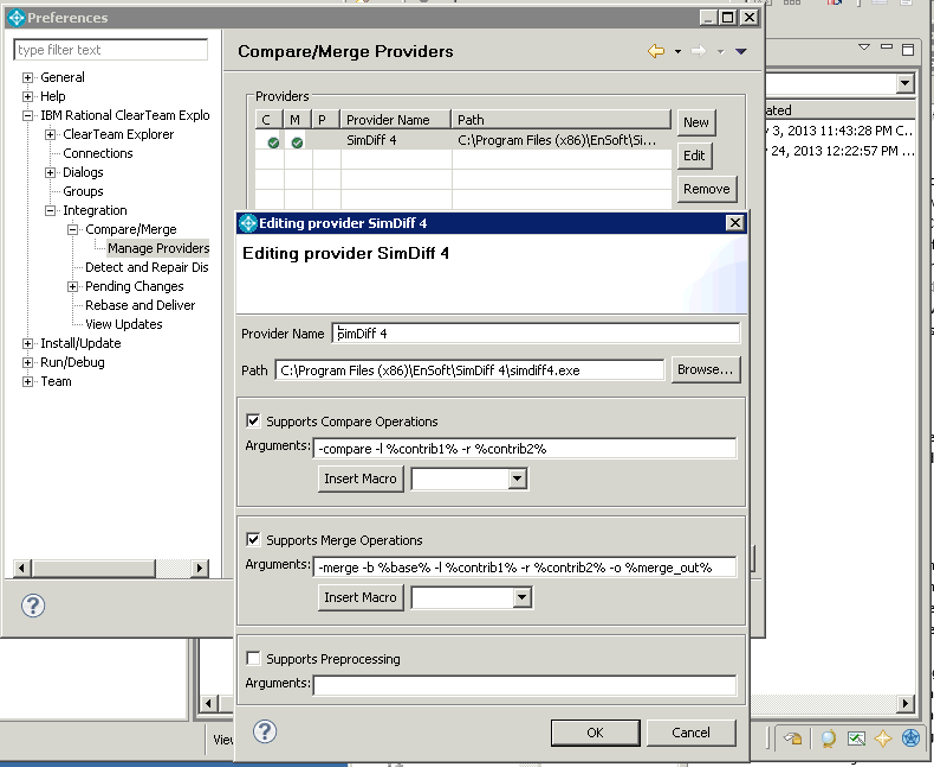
- Go to IBM Rational ClearTeam Explorer, then Integration, then Compare/Merge, then Manage Providers.
- Create a new provider with these settings:
- Provider Name: SimDiff
- Path:
<SD installation directory>\simdiff4.exe - Check Supports Compare Operations.
- Compare Operations Arguments:
-compare -l %contrib1% -r %contrib2%- Check Supports Merge Operations.
- Merge Operations Arguments:
-merge -b %base% -l %contrib1% -r %contrib2% -o %merge_out%- After the provider is created, press Apply in the main Preferences dialog to save the preferences.
Configure the SimDiff provider for MDL and SLX files
- Open the ClearTeam Explorer Preferences.
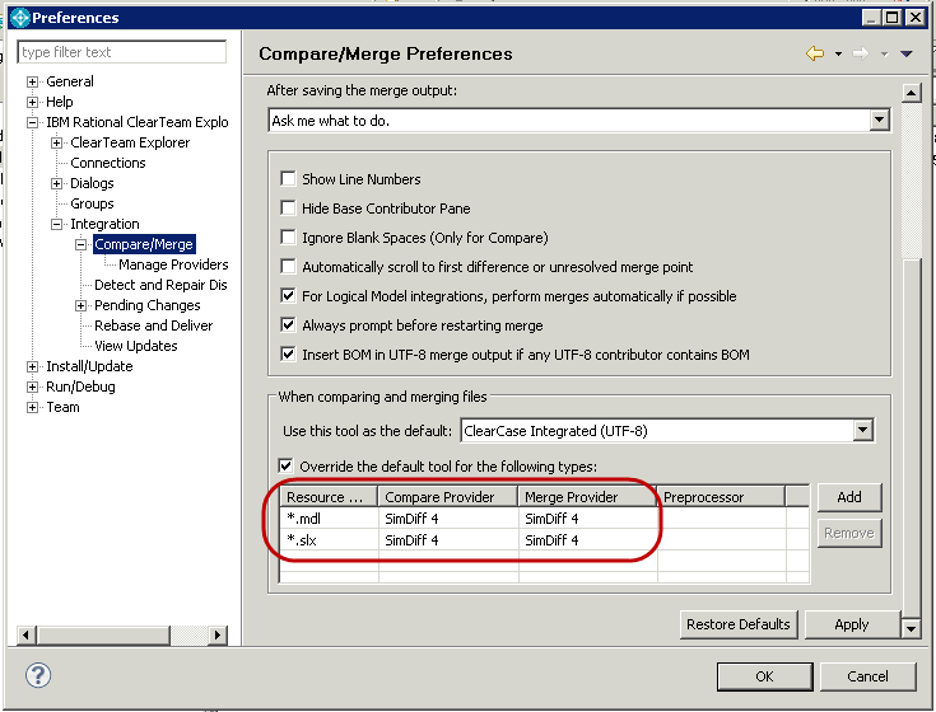
- Go to IBM Rational ClearTeam Explorer, then Integration, then Compare/Merge.
- Check Override the default tool for the following types.
- Add an override with Resource type
'*.mdl', Compare provider SimDiff, and Merge provider SimDiff. - Add a second override with the same providers and Resource type
'*.slx'.
References
Using another client? See Version Control Setup.
Have a question or want us to fix something?
Thank you.
We have your note about this page.