4. Methods, Assumptions, and Procedures
Our novel solution RULER (Resource Usage vuLnerability identifiER) pioneers a revolutionary machine-human integration that helps it scale to large software while maintaining accuracy in detecting sophisticated STRU vulnerabilities. RULER is built on top of the Atlas platform as a set of Eclipse plug-ins. It incorporates the analysis guidelines we mentioned earlier and contains a set of tools and means to address the inherent program analysis challenges in the following categories:
- Loop Modeling for AC/SC vulnerabilities
- Execution Path Sensitive Analysis
- Composable Accuracy Boundary aware analysis
- Interactive and Programmable What-if Reasoning
- High-level abstractions to model vulnerability mechanisms.
4.1 Architecture diagram
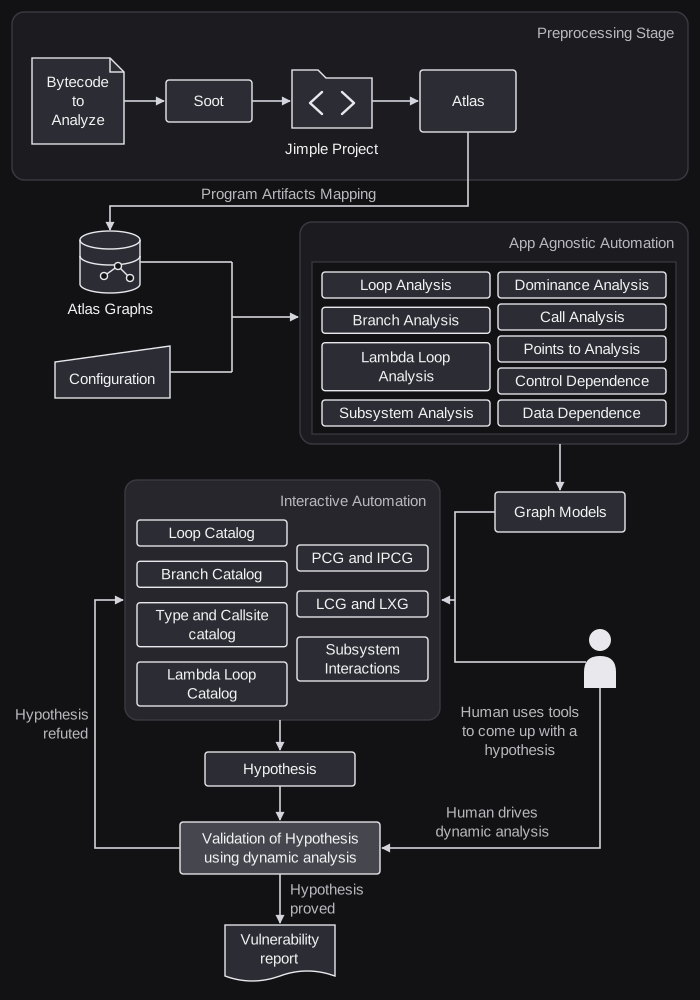
RULER system architecture is shown in Figure 1.
4.2 Discover Suspicious Program Segments
4.2.1 Loop Catalog
RULER can detect loops in given Jimple code using the Decompiled Loop Identification Algorithm by Wei et al [5] and the Loop Catalog tabulates the characteristics of each loop. RULER computes loop summaries consisting of 65 attributes. These include
- Source correspondence
- Loop monotonicity
- Loop iteration bounds
- Reachability
- Containment relationships with other loops, branches and lambda loops
- Subsystem interactions
- Path summaries w.r.t call sites (Java Development Kit (JDK) and non-JDK)
Figure 2 shows a screenshot of the Loop Catalog View. Each column corresponds to a characteristic. Each row corresponds to a loop header in the application.
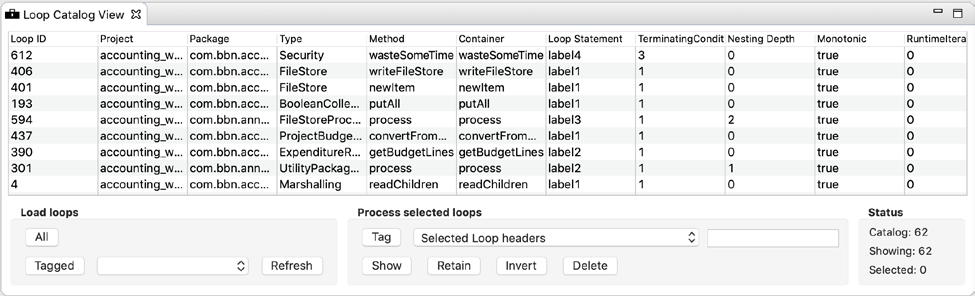
To start using the Loop Catalog, click “All” in the “Load loops” section of the view.
Analysts can click on a column header to sort the loops (rows) with respect to that loop characteristic. Analysts can select a subset of loops, which also selects the corresponding loop header in the Atlas graph, and can be used to drive Smart Views. Selection of a cell under a column representing interaction with a particular subsystem will change the focus of the “Subsystem Interaction” and “Subsystem Interaction PCG” Smart Views to that subsystem.
Loop selections can also be used to control the contents of the view: selected loops may be retained, (soft) deleted, or the selection may be inverted. Analysts can tag selected loops, or load loops with a certain tag. Clicking “All” will reload all loops. This is important to facilitate composition of the loops in the catalog with other analyses and Smart Views.
4.2.2 Branch Catalog
RULER is equipped with the capability to characterize branches in a given app. These characteristics include information about the branch’s location (project, method, etc.), the loops it is contained in or loops it governs, whether it is a termination condition, and call sites to various subsystems that it governs. All the computed characteristics of the branch are saved in the Atlas Graph as eXtensible Common Software Graph (XCSG) tags and attributes.
The Branch Catalog view provides a graphical interface for analysts to browse and filter branches in an app. Similar to the Loop Catalog view, the Branch Catalog view allow analysts to load all branches, or those with a specified tag name. Each row corresponds to a branch, and analysts can click on a column header to sort the rows with respect to that characteristic. Each column corresponds to a characteristic; in total 44 characteristics are provided.
Selection of branches in the table also selects the branch in the Atlas graph, which the Smart Views respond. Selection of a cell under a column representing interaction with a particular subsystem will change the focus of the “Subsystem Interaction” and “Subsystem Interaction PCG” Smart Views to that subsystem. Analysts can manage the contents of the view by selecting a subset of branches, and may retain or delete the selection from the view, or invert the selection.
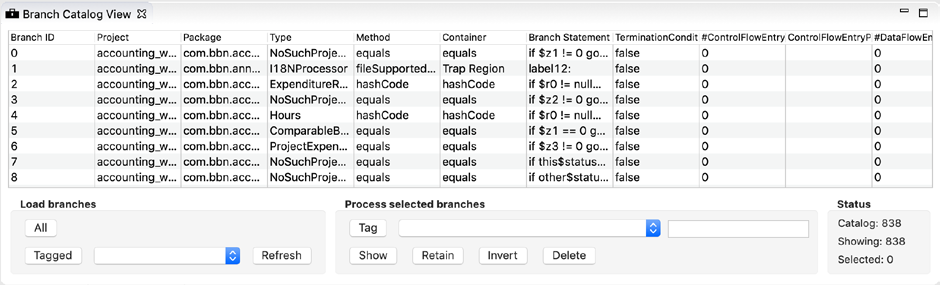
Figure 3 shows a screenshot of the Branch Catalog View.
4.2.3 Type and Callsite Catalog
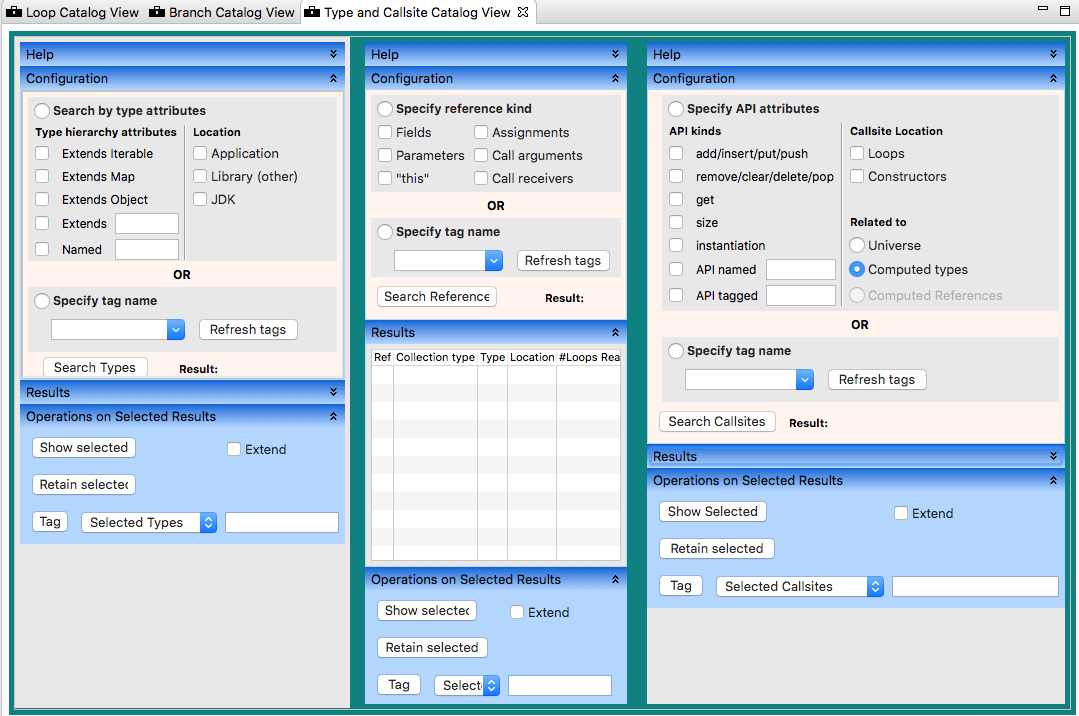
The Type and Callsite Catalog allow analysts to search for, browse, filter, and select types. References and call sites in the app, JDK, or other libraries used by the app. Similar to the loop and Branch Catalog views, analysts can click on a column header to sort the rows with respect to that characteristic of the type, reference or call site. Types can be selected by specifying the type name, a tag name, or whether they extend. Java’s root types in the collections type hierarchy (such as Iterable and Map). The analyst can show or tag the selected collection types, references and call sites (and optionally, the loops containing or branches governing them) from the user interface. This enables composition of the result with shell queries, Smart Views and subsystem interaction views. This view is useful to narrow down artifacts by enabling analysts to quickly locate collections in the app, loops reachable from references of selected types, and the related call sites. Figure 4 shows a screenshot of the Type and Callsite Catalog view.
4.2.4 Lambda Loops Catalog
Java 8 introduced functional programming concepts to Java and added Lambda Expressions to the language. Lambda expressions can be used to form loops, which are implicit loops, e.g. a loop created by a call site such as java.util.stream.Collector.filter(). RULER is capable of detecting such loops called Lambda Loops. The Lambda Loop Catalog tabulates the characteristics of each lambda loop. In total, it lists 15 characteristics of a lambda loop including:
- Source correspondence
- API forming the loop
- Reachability
- Containment relationship with loops and branches
Each column corresponds to a characteristic. Each row corresponds to a lambda expression in the application. Figure 5 shows a screenshot of the Lambda Loop Catalog. To start using the Lambda Loop Catalog, click “All” in the “Load lambda loops” section of the view.
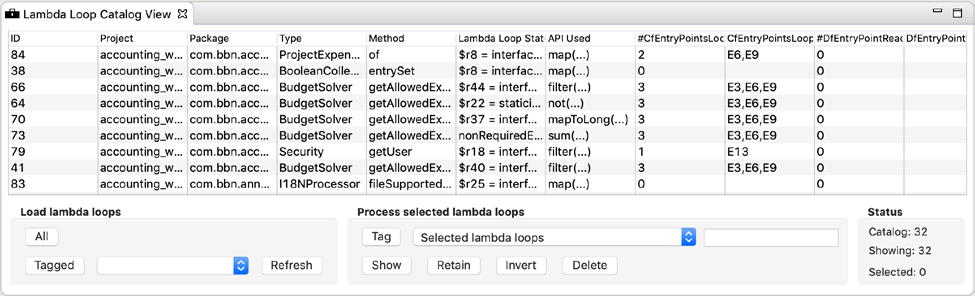
Analysts can click on a column header to sort the lambda loops (rows) with respect to that lambda loop characteristic. Analysts can select a subset of lambda loops1, which also selects the corresponding lambda expression nodes in the Atlas graph and can be used to drive Smart Views. Selection of a cell under a column representing interaction with a particular subsystem will change the focus of the “Subsystem Interaction” and “Subsystem Interaction PCG” Smart Views to that subsystem.
1 Multi-select is supported on macOS and Windows 10
Lambda loop selections can also be used to control the contents of the view: selected lambda loops may be retained, (soft) deleted, or the selection may be inverted. Analysts can tag selected lambda loops, or load lambda loops with a certain tag. Clicking “All” will reload all lambda loops. This is important to facilitate composition of the lambda loops in the catalog with other analyses and Smart Views.
4.2.3 Loop Call Graph
The Loop Call Graph (LCG) is an induced subgraph of the call graph that retains only methods that contain loops and the call graph between them. The LCG incorporates knowledge of call sites within loops to understand the inter-procedural nesting.
4.2.4 Projected Control Graph
The number of possible execution paths may be very large, but the number of distinct behaviors along these paths according to criteria of interest may be much smaller. The Projected Control Graph (PCG) is a compact graph derived from the Control Flow Graph (CFG) where CFG paths are grouped into equivalence classes based on behaviors relevant to AC and SC vulnerabilities.
The set of paths in a PCG are in a 1-to-1 correspondence with the equivalence classes of paths in the CFG. The PCG is computed with respect to STAC-specific events that may include: (1) loop headers detected using DLI algorithm [5], (2) call-sites with a call chain to a function containing a loop, and (3) statements that modify loop control variables. Intuitively, the PCG is the subgraph induced by the event nodes and newly added edges wherever necessary to reflect reachability in the graph. Tamrawi et al [6] provide a formal definition of the PCG and presented an efficient algorithm to construct the PCG are documented.
Additional details on PCGs and documentation can be found online at: https://ensoftcorp.github.io/pcg-toolbox.
4.2.5 Loop Termination Dependency Graph
The Loop Termination Dependency Graph (LTD) depicts the data flow dependencies of termination conditions of a given loop. It receives as an input the Control Flow Node marked as a Loop Header and outputs the Termination Dependence Graph (TDG) for the loop. Initially only roots of the graph will be displayed.
4.2.6 Taint Analysis
RULER computes a whole-application version of Taint which is used by downstream automation to call attention to program features which may be reached by externally-controlled input. However, it can be used interactively to follow data dependence anywhere in the application, regardless of whether RULER believes the input is externally controlled. Taint is based on Atlas data flow, with some modifications that improve transitive operations and provide more succinct data dependence graphs.
RULER adds Taint to the XCSG graph primarily by adding tags to existing data flow edges, but also by adding tags to call site edges. This transformation causes calls to library methods to resemble an operator node in data flow. In figure 6 below, the invoked method is CommandLineParser.parse() in the Apache commons library. XCSG normally represents calls sites using all of the edges in the figure, but note that the dashed lines are data flow (XCSG.DataFlow_Edge), whereas the solid lines represent parameters being passed to the call site. The Taint edges are marked in green. Using only data flow, the flow would pass from parameters to invoked method body, and the return value would flow back to the invocation call site. By providing a Taint overlay, RULER can provide a view of the call site, which flows directly from input arguments to method return value.
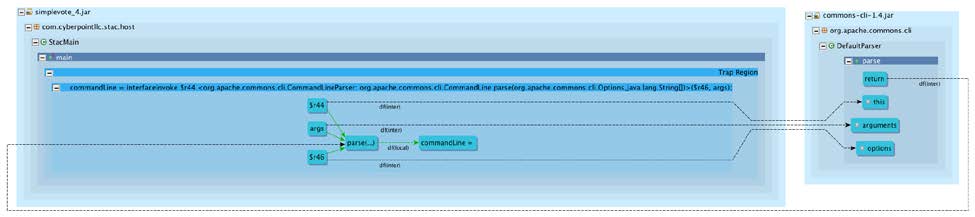
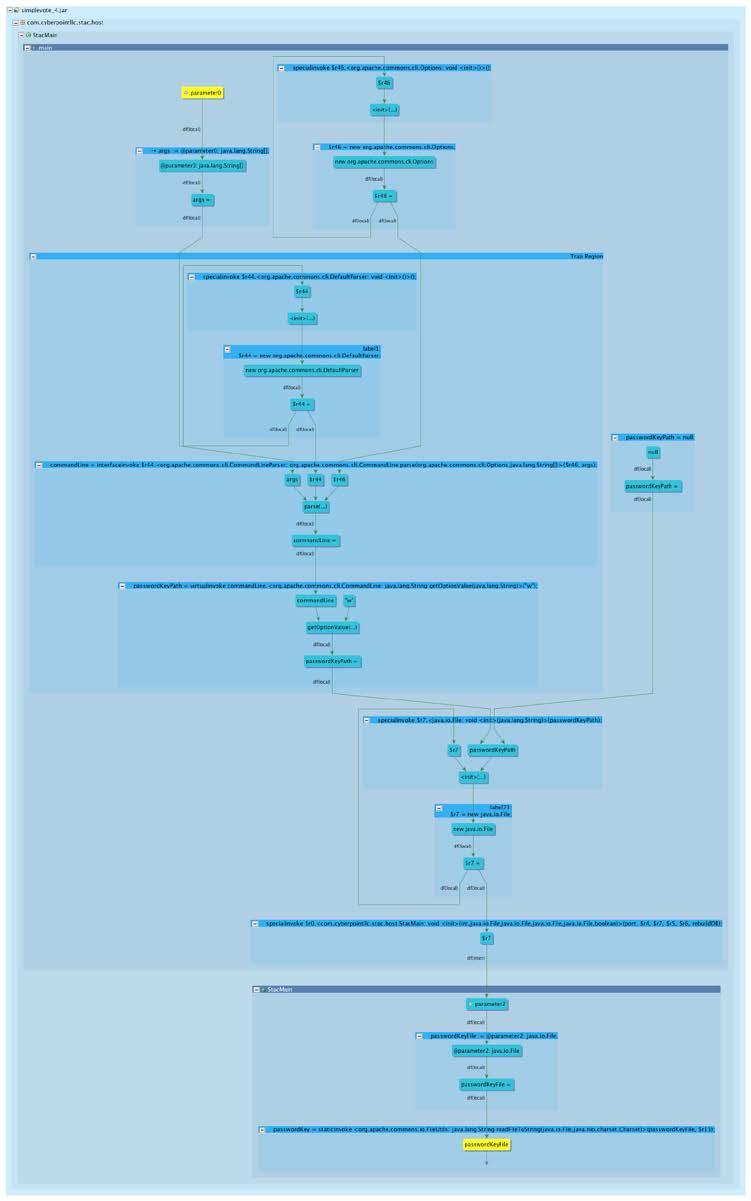
Figure 7 illustrates a partial Taint graph from a File object, tracing back to the main method’s String arguments. The File object represents the password key file. Reading the Taint graph like an AST, it can be observed that the filename is controlled by the -w option. Side note: the implementation of Taint creates cycles as a side effect of ensuring that constructor arguments “Taint” the new object.
4.2.7 Subsystem Tagging
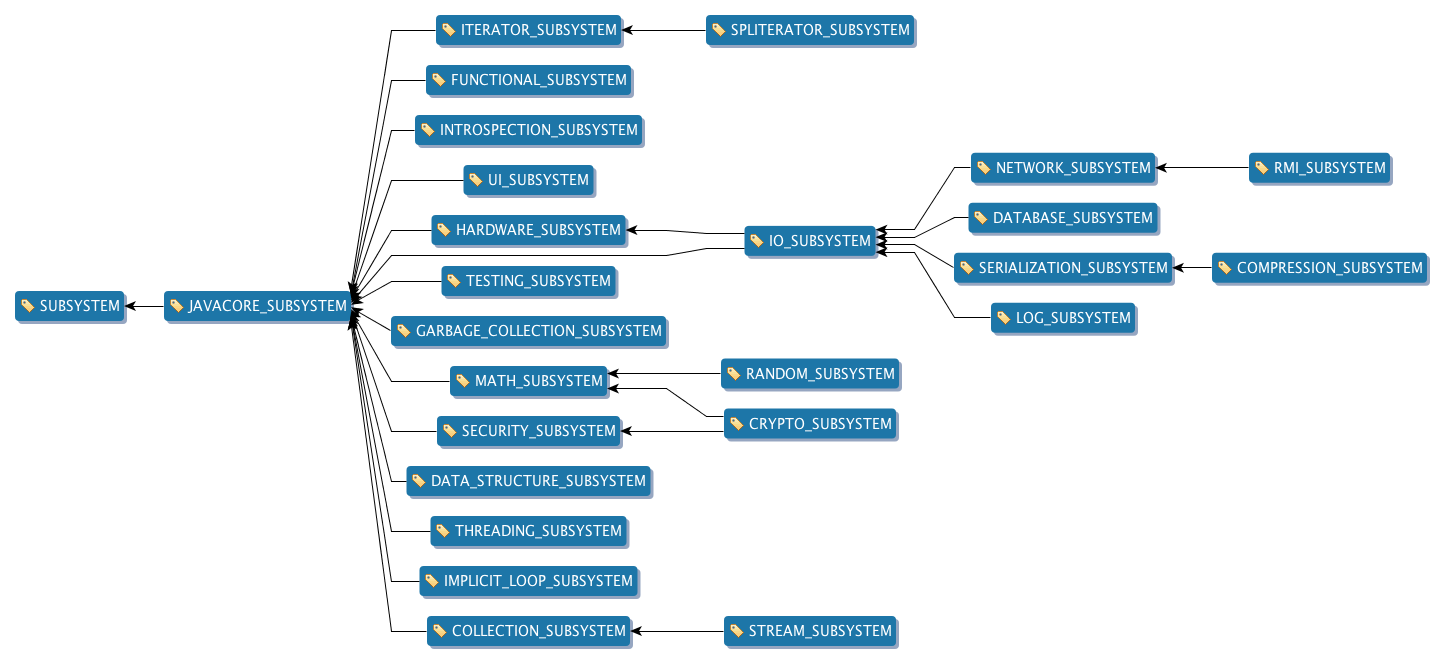
We classified JDK Application Programming Interfaces (APIs) into functional categories, which we call subsystems of the JDK. The framework for subsystem tagging supports addition of new subsystems in the future. This tagging is useful to investigate the interaction of a method or loop with a particular set of APIs in the JDK. By default, RULER is configured to compute interactions with the Input and Output (IO) subsystem.
The subsystem names, and some key packages/classes whose APIs are included in each subsystem are tabulated in Table 1.
| Subsystem | Example packages/classes with APIs belonging to the subsystem |
|---|---|
| JAVACORE_ | java.util, java.lang |
| HARDWARE_ | javax.sound, javax.sound.midi |
| IO_ | java.nio, java.io |
| NETWORK_ | java.net, javax.net, java.rmi |
| RMI_ | org.omg.CORBA, javax.rmi.CORBA |
| DATABASE_ | javax.sql |
| LOG_ | java.util.logging |
| SERIALIZATION_ | javax.xml.bind, javax.xml.ws.soap |
| COMPRESSION_ | java.util.jar, java.util.zip |
| UI_ | java.applet, java.awt, java.swing |
| INTROSPECTION_ | java.lang.reflect, java.lang.invoke |
| GARBAGE_ | java.lang.ref |
| SECURITY_ | java.security, javax.security, javax. |
| CRYPTO_ | javax.crypto |
| MATH_ | java.math |
| RANDOM_ | java.util.Random, java. |
| THREADING_ | java. |
| DATA_ | java.beans |
| COLLECTION_ | java. |
| STREAM_ | java.util.stream |
| ITERATOR_ | java.util.Iterator |
| SPLITERATOR_ | java. |
| FUNCTIONAL_ | java.util.Function |
The graph of hierarchy of subsystems is shown in figure 8. An edge in this graph represents a containment relationship. For example, an edge from SPLITERATOR_SUBSYSTEM to ITERATOR_SUBSYSTEM means that SPLITERATOR_SUBSYTEM is contained in ITERATOR_SUBSYSTEM.