3.1.2 Android Security Toolbox
How can a man-machine analysis system detect novel, sophisticated, and domain-specific malware?
Our research to address this question led to several interesting innovations. Using the program analysis platform Atlas, we have incorporated these innovations in a domain-specific toolbox, called the Android Security Toolbox for detecting malware in Android Apps. The Security Toolbox is designed with following goals:
- Minimize the human effort for (a) cross-verifying automatically detected malware, (b) performing what-if experiments to hypothesize, refine, and postulate application- specific malware that is not on the radar of automated malware detection.
- Incorporate the rich and complex Android semantics of API permissions, components such as Activities, Services, Content providers, Broadcast receivers, and XML resource files.
- Provide a decoupled architecture for an evolution and user-friendly malware detection tool. The malware detection capability is decoupled and built on top of the program analysis platform (Atlas). The underlying design philosophy is similar to platforms like Matlab or Mathematica with domain-specific toolboxes built on top of general-purpose machinery.
In our ICSE 2015 paper, we describe the design and use of the Android Security Toolbox.
Video: http://youtu.be/WhcoAX3HiNU
3.1.2.1 Permission Mapping
Android's sensitive functionalities such as sending and receiving text messages, accessing geo-location information, or accessing user contacts are protected by runtime checks that enforce whether or not an application has been granted permission to invoke such functionalities. The Security Toolbox leverages the permission mapping produced by the Toronto PScout research group. For each API version of Android, we transform the PScout mapping to an XML file that precisely represents the permission-protected methods. The Toolbox contains code for parsing an Application's manifest, and uses the XML file to automatically annotate the correct API mapping onto the Atlas program graph. We have automatically scraped and encoded into Java objects the Google developer documentation for permissions, permission groups, and protection levels to aid in developing analyzers. Additionally we have recovered mappings for Android permissions to protection levels, and permissions to permission groups by mining their relationships from the Android source.
3.1.2.2 Analyzers
An analyzer conforms to specifications defined by the Security Toolbox. Specifically an analyzer encapsulates a name, description, set of analysis assumptions, and the analysis program to be executed. The programs written in Java invoke Atlas APIs to access the information in the graph database and typically its purpose is to check one or more security properties. The result of the analyzer, called “envelope,” is an Atlas graph that captures the program semantics relevant to the property. The graph can be empty if the property is undetected and non-empty if the security property is detected. The graph may be shown to be interacted with by the human analyst or used as input into another analysis. For instance a confidentiality analyzer might first do a cheap insensitive taint leak (reachability test) between an automatically detected source and sink pair (e.g. a flow from the SIM card number to the Internet). If the resulting graph is non-empty but very large we could pass the graph to a more expensive sensitive (call, object, type, flow, etc.) taint leak analysis to prune false positives from the graph. The toolbox refers to this type of recommended analyzer chaining as “continuations”.
Analyzers have been subdivided into five categories: properties, smells, confidentiality, integrity, and availability. A property is something the analyst should be aware of, but does not necessarily indicate malice, such as uses of native code. A smell is a heuristic similar to a property that indicates a stronger suspicion, which demands a justification, such as using Java reflection to invoke a private Application Programming Interface (API) method. The Security Toolbox takes the conservative approach of making smells trend towards tighter heuristics that only report with high confidence. The confidentiality, integrity, and availability (CIA) analyzers detect violations of CIA properties using taint analysis of sources and sinks, modification operations on sensitive mutables, and loop detection of expensive resources respectively. Sources, sinks, mutables, and resources are inputs to the CIA Analyzers.
The analyzers in the Security Toolbox are general-purpose analyzers. We can only add analyzers and input models (e.g. sources and sinks) that can be written a priori. Domain specific knowledge such as the fact that the result of a certain sensitive calculation should be treated as a source of information for confidentiality leaks still needs to be determined at runtime by a human analyst. Once the new confidentiality source is discovered however, it is a trivial task to run the various taint leak detection analyzers with the new information.
3.1.2.3 Indexers
Since Android makes extensive use of extensible markup language (XML) for its user interface, manifest, and other resources many important program artifacts are missing in the Java program graph produced by Atlas. The Security Toolbox provides indexers to annotate and add missing program elements from these resources to the Atlas program graph.
In another use case for custom indexers, Atlas provides a conservative open-world approximation to resolve dynamic dispatches, but leaves the necessary raw information for type-sensitive answers to be computed. This arrangement is ideal because it allows the Security Toolbox to explicitly choose a desired speed vs. accuracy tradeoff that suits the situation. For conservative dynamic dispatches, the Security Toolbox implements a type inference indexer that reduces the set of conservative edges by tagging edges that it can show are likely runtime behaviors. To enable object sensitivity, Atlas provides unique object instance ids, which can be used to maintain call site histories and perform sensitive data flow traversals.
3.1.2.4 Dashboard
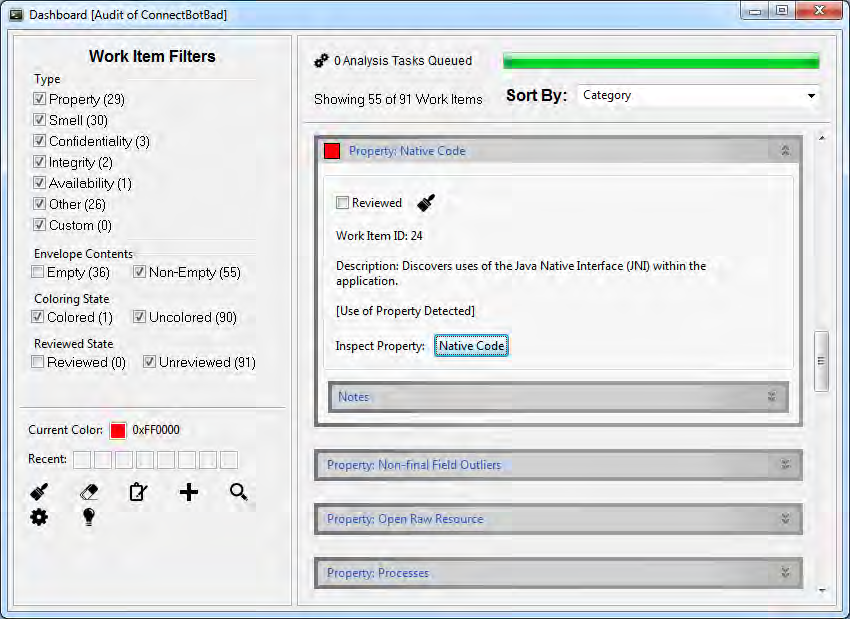
The Dashboard (shown in Figure 2) is an interface for automating the execution and managing results of the Toolbox's automated analyzers. The Dashboard accounts for analyzer dependencies to enable the highest amount of parallel computation while running a multitude of analyzers. As results are computed, they are presented to the analyst in the work item queue on the right of the Dashboard. Results can be filtered by category and marked as reviewed. Optionally an analyst can make additional notes on a work item. Since work items correspond to subgraphs of the program graph, they can be named and even colored to help identify separate program subsystems. Program artifacts can be manually added or removed from a work item based on the colors given to program artifacts.
Since some analyses depend on the results of another analysis, such as type inference or resource indexing, and other analyses do not have prerequisite analyses some results can be computed in parallel. The Dashboard builds a precedence graph and prioritizes the analyses that enable the maximum amount of parallelization.
Results can be inspected as soon as they are available, and the analyst can sort and filter results by type, contents, and state. State can either be reviewed or un-reviewed and colored or uncolored. An analysis result can optionally be assigned a color. The color is simply an Atlas tag for all of the graph elements inside of the work item. Additional elements outside of the original result set can be colored with the same coloring to manually add elements to the work item.
Each analysis work item has a note-taking field that allows the analyst to record time-stamped notes. Using a utility developed for the Security Toolbox called AuditMon, the Dashboard can record selection events directly into the Atlas program graph. This information can later be used to review the audit.
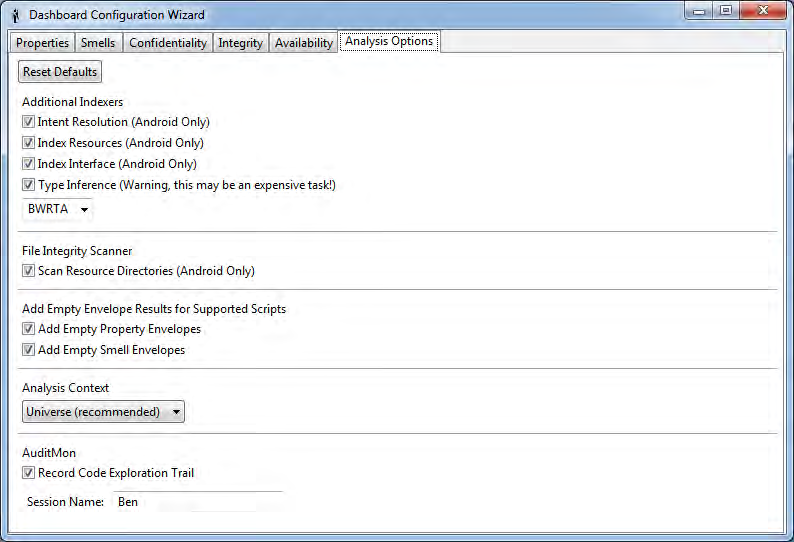
Since analyses contain configurations options, such as selecting trade offs on accuracy vs. time, the Dashboard provides a configuration wizard (Figure 3) to enable or disable individual analysis programs or select analysis strategies.