
I. Introduction
Over the last decade, the automotive industry has embraced model based development for control systems. Many of these companies have chosen Simulink from MathWorks to design and simulate these models[1]. However, a remaining issue is the fact that many control systems were initially written in C and are still being used. Some companies have attempted to manually convert these C systems to Simulink models but have given up as the conversion became too costly, error-prone, and time consuming.
EnSoft decided to tackle this problem by providing a semi-automated conversion built using our Atlas for C tool. Atlas maps software and creates a relation map for all parts of the program. It then offers the developer tools to query and visualize this graph. We have developed Modelify, an Eclipse plug-in that will perform the necessary queries on a C project and create equivalent Simulink models and subsystems. In this paper we will discuss some of the difficulties in such a conversion, including handling conditional logic and global variables. We will also discuss how Atlas can be extended to create custom tools for visualizing, understanding, and validating C source code.
II. Evolution of Software Development for Automotive Control Systems
When software is embedded in complex machines, such as cars and airplanes, a multi-disciplinary team is needed to develop it. This multi-disciplinary team might include control engineers who understand the physics and mathematics behind controlling the vehicle and software engineers who translate the domain knowledge into highly efficient code.
Model-based design tools like Simulink allow a control engineer to design, analyze, and test a control strategy in a virtual environment without writing any code. Simulink models are graphical, thereby allowing a control engineer to explore ideas in an environment that lends itself to the way they think about the problem.
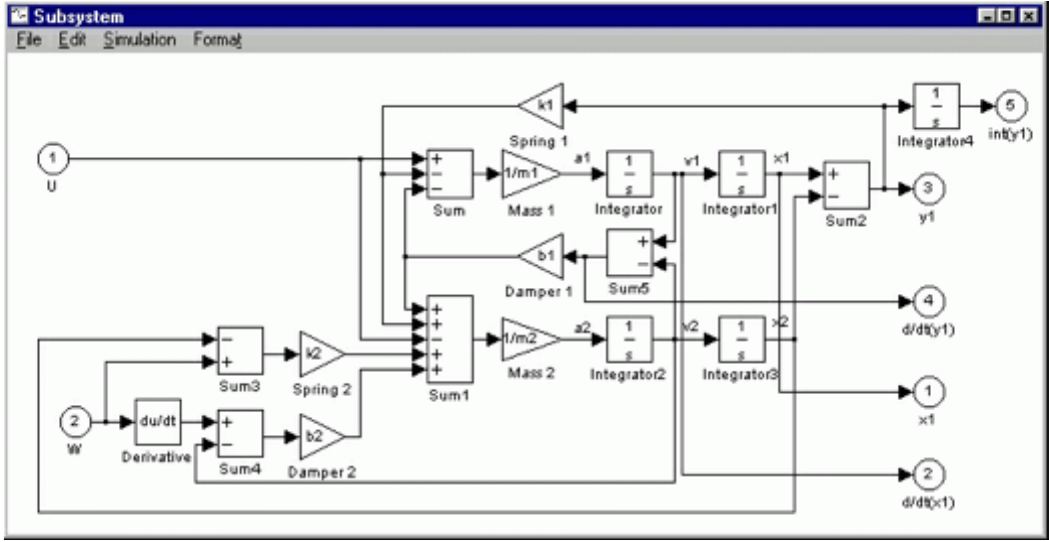
In addition to aiding in the control strategy design process, Simulink models can serve as an executable specification that the software team can translate into efficient code that runs on an electronic control unit (ECU). Although models are precise and executable, they can differ from the code that eventually goes into a production ECU. For example:
- Code may use lower precision arithmetic - often fixed point arithmetic.
- Models running on fast workstations can compute many more steps per second than code on an ECU.
- Adjustments to the code may happen later in development that may not be incorporated in the model.
When changes to the control software are needed,x the control team changes the model and then the software team updates the software. This update strategy allows the software to evolve without having to replicate the work done by the software team to achieve efficiency.
Two forces have reduced the need for hand code (code that is translating models to code by hand). First, automatic code generators have improved to such a degree that for many cases the performance difference between hand code and generated code is acceptable[2]. Second, the cost of faster processors has dropped.
Therefore, today we are in a situation where a controls engineer can design control software entirely in Simulink and deliver reasonably efficient C code for integration. The software team is still responsible for other tasks such as integrating applications together with an RTOS. However, it is not necessary for them to tediously translate models into C code by hand.
So why do we still use so much hand code? Simply put, we have millions of lines of legacy code. Some of that code has corresponding models, but much of it does not. Even for hand code with corresponding models, there is concern that some important changes occurred only in the hand code and are missing from the models.
Therefore, many companies are left with only 3 options:
- Continue to translate models to code by hand for existing projects/modules, and only use Simulink and auto code for new projects/modules.
- Reverse engineer their own products and reimplement them in Simulink.
- Translate code to Simulink by hand.
The first option doesn’t allow one to get the increased efficiency of autocoding models. The second and third require a huge upfront cost or alternatively, take a very long time.
If we can automatically translate models to code, could we automatically translate code into models? In a traditional compiler, we are concerned with correctness and performance[3]. However, if we are translating C into models, rather than into machine code, we are concerned with correctness and maintainability. By maintainability we mean that the resulting models need to be readable by control engineers, reflect a good system architecture, and work well in a company’s design and development process. In addition. we have a scalability challenge. Some legacy C control systems are comprised by half to a million lines of code.
We built Modelify, which converts C code into Simulink models. Rather than starting from scratch, we leveraged Atlas, a rich platform for understanding and analyzing large software. In the sections below, we describe what Atlas is and how the information it provides helps us address the challenges to building Modelify.
III. Atlas
Atlas makes it easy for you to make custom Eclipse plug-ins that process and visualize Java and C code[4]. Atlas parses and analyzes source code and produces a graph which can be queried from any JVM-compatible language, such as Java or Scala.
This graph contains:
- The major declarations (projects, types, packages, fields, and methods), and associated relationships, such as the type hierarchy.
- Method-level relationships, such as calls and reads/writes of fields, among other things.
- Control flow for each method
- Detailed data flow
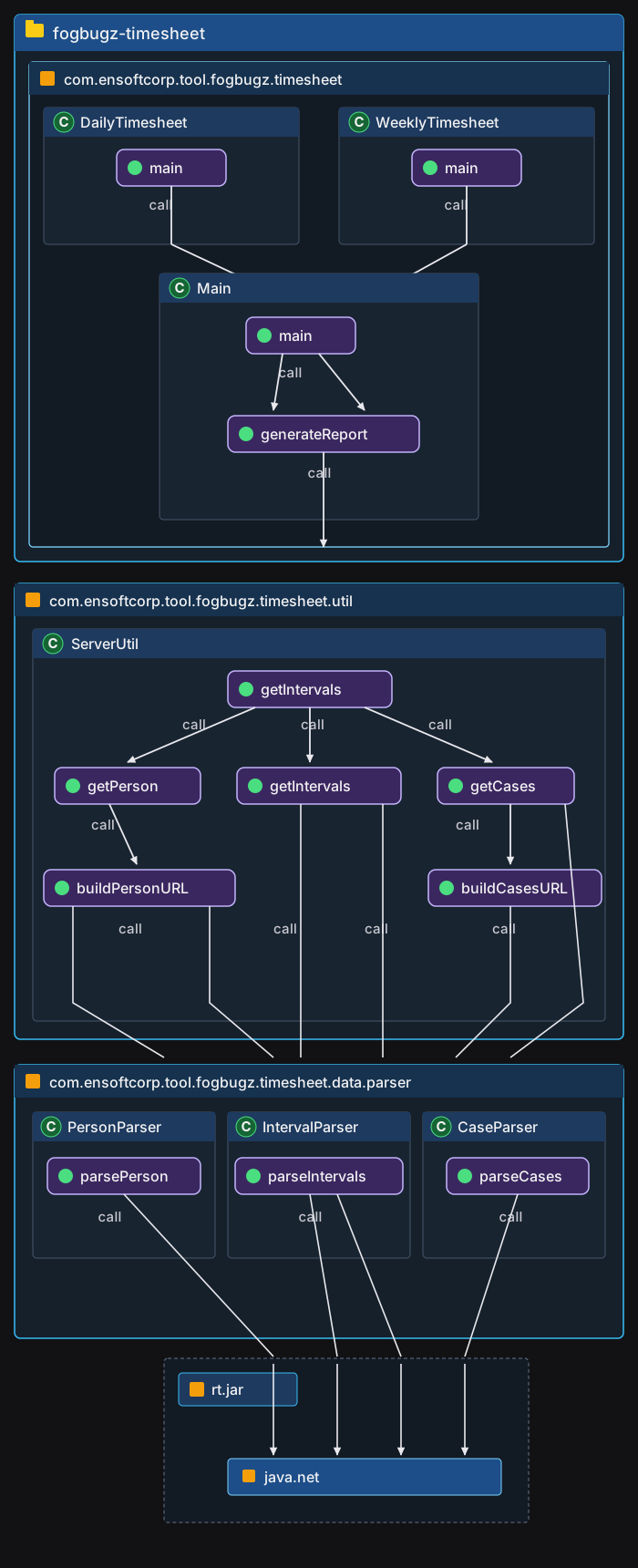
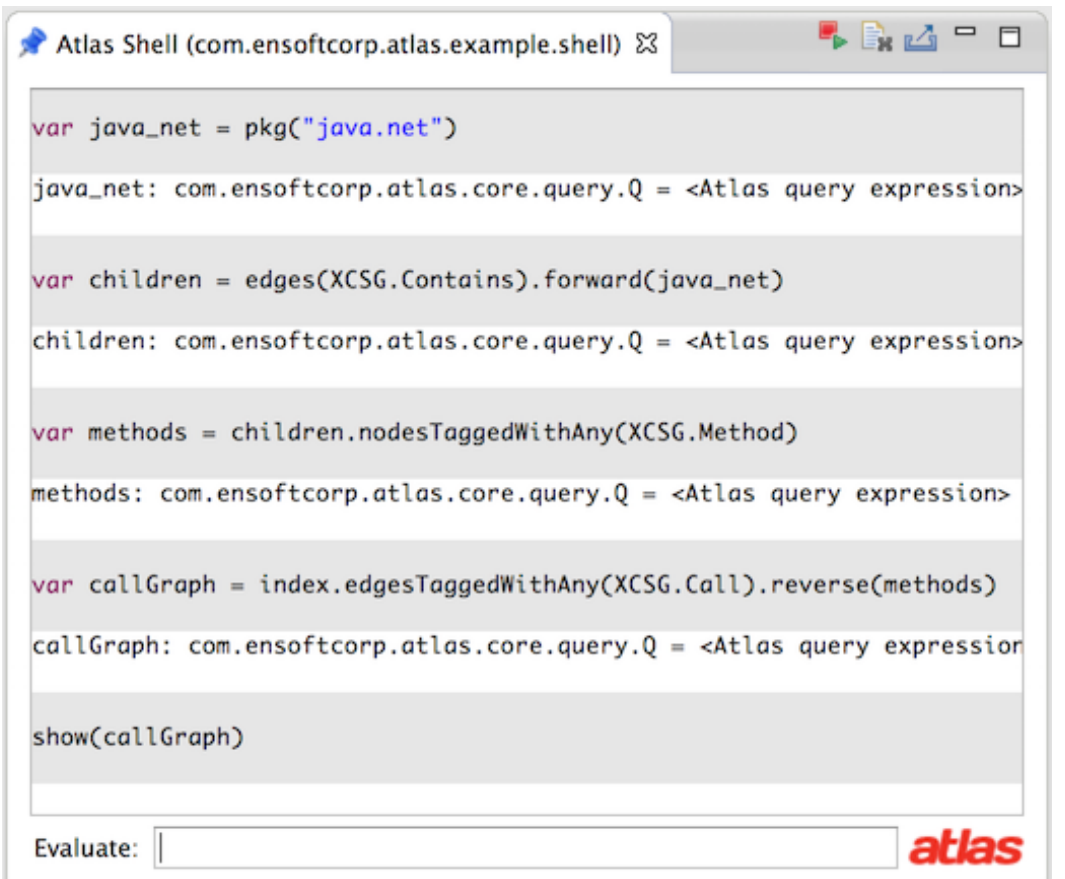
For example, the queries below let you visualize how your program interacts with the java.net package:
Q java_net = pkg(“java.net”);
Q children = edges(XCSG.Contains).forward(java_net);
Q methods =
children.nodesTaggedWithAny(XCSG.Method);
Q callGraph =
index.edgesTaggedWithAny(XCSG.Call).reverse(methods)
show(callGraph);
Figure 2 contains the result of these queires
A. eXtensible Common Software Graph
The graph Atlas produces follows the eXtensible Common Software Graph (XCSG) schema[5]. XCSG defines a semantically rich graph representation of software (i.e. source code or binaries), suitable for many applications, such as mining software for patterns, malware and defect detection, building static analysis tools, and code comprehension.
XCSG has semantically precise definitions for program artifacts to enable a harmonious representation of software written in different languages. Without precise semantics, analysis tools can easily develop a language bias that leads to incorrect processing of other languages, especially while analyzing software written in multiple languages. For example, the static keyword in C and Java have overlapping but incompatible uses, which XCSG disambiguates. As compared with AST-like approaches to program representation, XCSG is tailored for a graph database, and encompasses representations of analysis results, such as control flow and data flow graphs.
We provide the XCSG definition for a Function here to give you an idea of what XCSG is like. The full reference for XCSG can be found at: http://ensoftatlas.com/wiki/Extensible_Common_Software_Graph
XCSG:Function
The semantics of Function are those common to functions in C/C++ and methods in C++/Java.
As Functions can be abstract methods, they do not always represent implementations; however, function declarations without definitions (as possible in C and C++) that are not abstract methods of some Classifier are not considered Functions.
The tag inline indicates the presence of a hint to the compiler that the function should be considered as a candidate for inlining. It does not guarantee that calls to the function will always be inlined. In particular, calls that involve dynamic dispatch are generally not inlined, irrespective of the value of this attribute. The inlining of a method should not affect its semantics.
| Metaclass | Function | |||
|---|---|---|---|---|
| Extends | Node | |||
| Description | A callable subroutine which may take Parameters and which has a Return type. | |||
| Direct Subkinds | GlobalFunction, Method | |||
| All Superkinds | Node, ModelElement | |||
| Specified In Edges | ||||
| Inherited From | In Edge | Predecessor | Multiplicity | Description |
| InvokedFunction | StaticCallSite | ✱ | Connects a StaticCallSiteto the exact Functioncalled. | |
| Node | Contains | Container | 1 | Indicates that the predecessor contains the successor in a sense specified by the specific type of Contains edge. |
| Specified Out Edges | ||||
| Inherited From | Out Edge | Successor | Multiplicity | Description |
| HasParameter | Parameter | ✱ | Connects a Function to aParameter of that Function. | |
| HasReturnValue | MasterReturn | 0..1 | Connects a (non-void)Function to itsMasterReturn node. | |
| Returns | Type | 1 | Connects a Function to theType of its return value (which may be Void). | |
| Throws | Type | ✱ | Indicates that a Function is statically known to be capable of throwing a value or instance of the indicated Type as an exception. | |
B. Atlas Queries
Atlas Queries can be executed from any JVM-compatible language, such as Java or Scala. To support rapid prototyping and open-ended exploration, Atlas includes a shell view where you can execute Atlas queries using Scala.
The Q interface provided by Atlas contains a variety of methods for building query expressions. These methods will return the query, allowing you to chain expressions together. Below are some example queries.
Starting from the index (XCSG graph computed from source code), we can select all types named “Base”, using the query Q.types(java.lang.String). By “types”, we include classes, interfaces, enums and annotations.
// all types named Base
var t = index.types(“Base”)
The show() method displays the result in a graph editor.
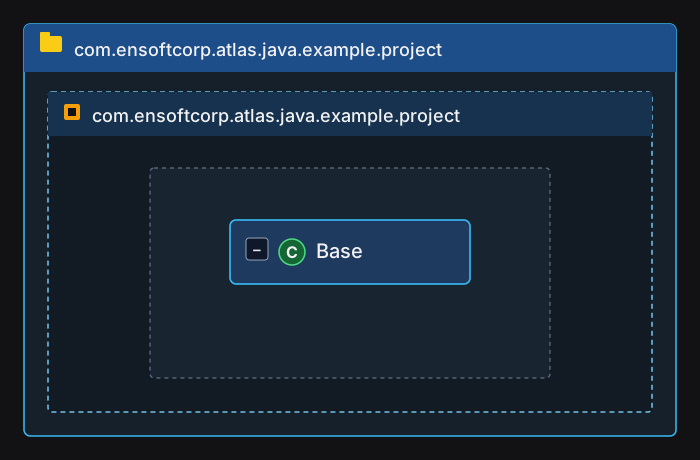
show(t)You will see the class Base, along with its parent package and project. This is because show() is automatically providing some visual context by including the nodes which point to the result via an XCSG.Contains edge.
Now that we have a way to query for the type called “Base”, what can we do with it? A simple thing to do is to get the type hierarchy.
In consulting the XCSG interface, we find that XCSG.Type nodes have edges tagged XCSG.Supertype which point to their parent type. How can we query for the subtypes of “Base”?
We can walk the XCSG.Supertype edges down to the subtypes. Since a type points to its supertype, we walk the edges in the reverse direction to get the subtypes. To walk the edges, we will use the Q.reverse() query.
But first, we have to set up the Graph in which the traversal will take place. The easiest way to walk over a certain kind of edge is to set up a filter on the edges. We accomplish this using the Q.edgesTaggedWithAny() query.
The edges we are interested in are tagged XCSG.Supertype. Now, put it all together.
// get a reference to Base
var base = index.types("Base")

// filter edges
var edgesSupertype =
index.edgesTaggedWithAny(XCSG.Supertype)

// walk to the subtypes from Base
var result = edgesSupertype.reverse(base)
show(result)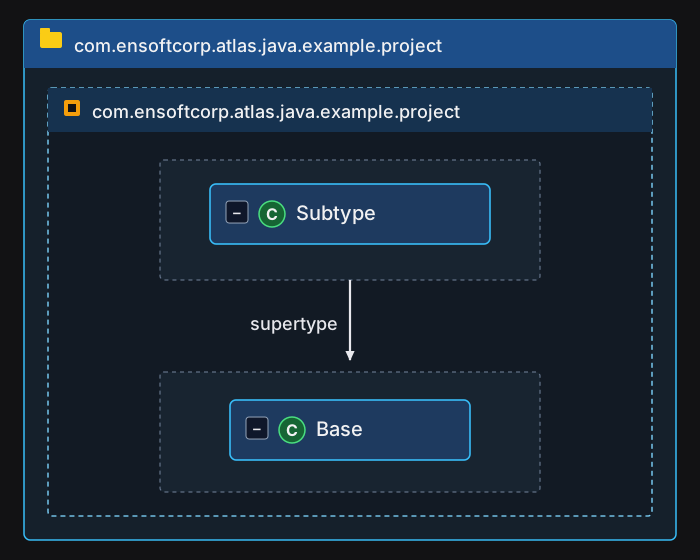
IV. Building Modelify
Modelify is an Eclipse plug-in built on top of Atlas (which itself is a collection of Eclipse plug-ins). To build Modelify, we rely on Atlas to compute an XCSG graph of the C code we want to convert to Simulink and then use Atlas queries to traverse the XCSG graph and emit Simulink models. The Simulink models themselves are built using Simulink’s API. Since Atlas can handle millions of lines of code[6], Modelify inherits Atlas’ scalability.
Although there are many differences between Simulink and C, the two most important for conversion are:
- Simulink is a data flow language. There is no need to declare variables, instead we connect the output of one computation directly to another.
- Simulink encourages the use of high-level constructs borrowed from signal processing.
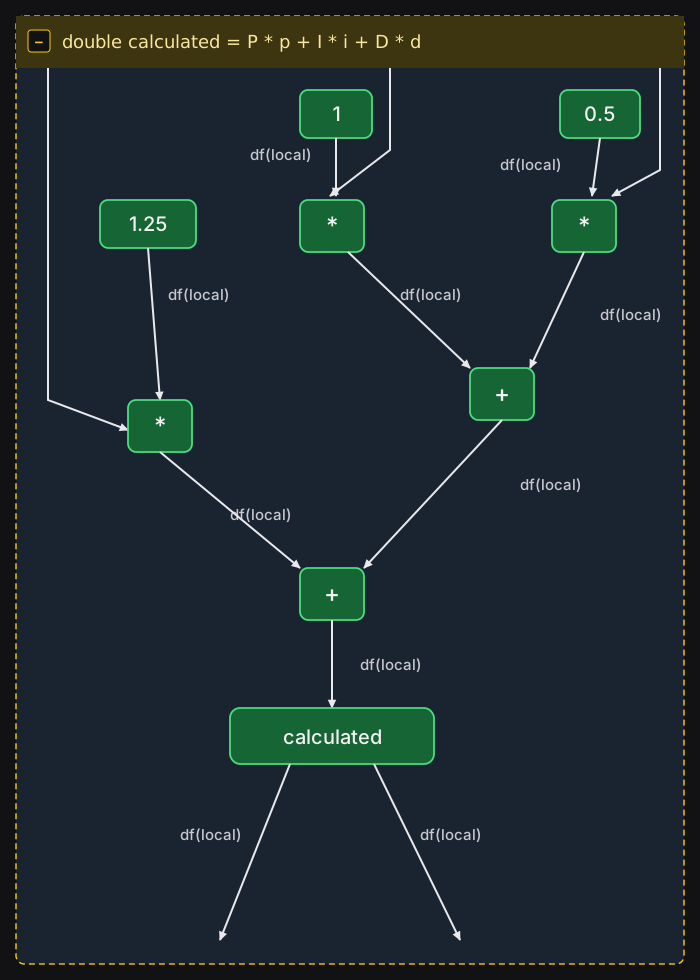
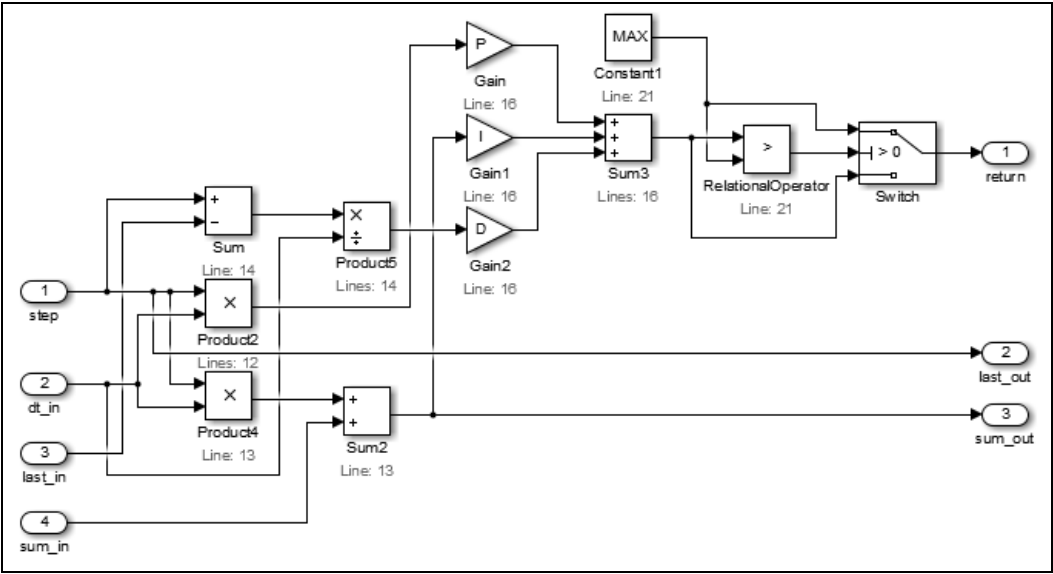
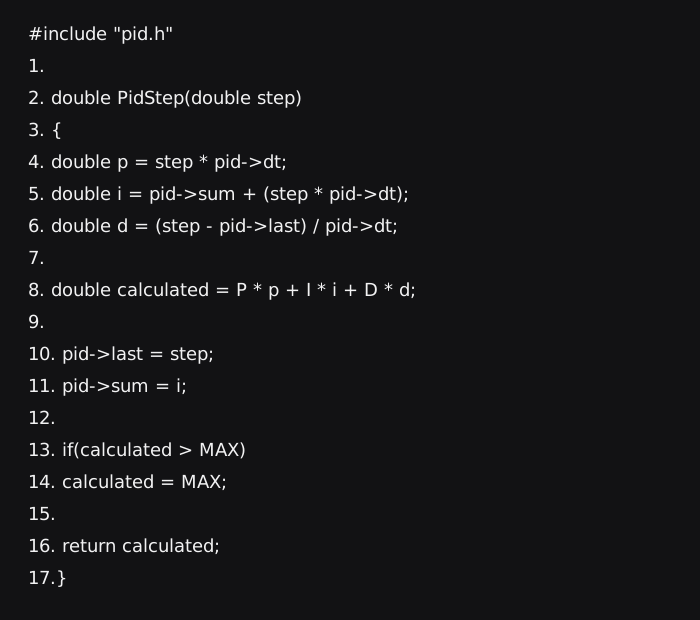
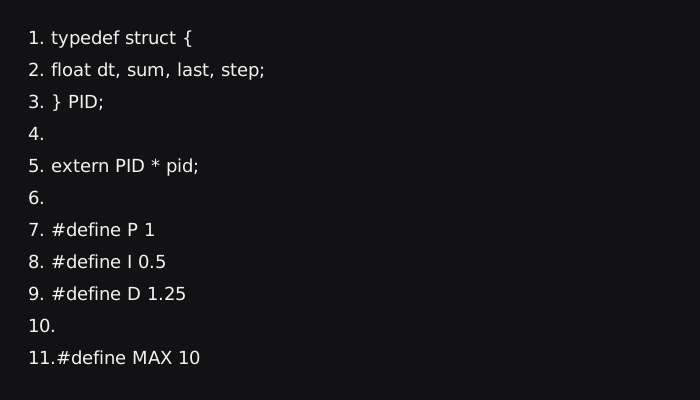
Since data flow graphs of languages like C are useful for many analyses, they are already part of the XCSG graph. For example, the data flow graph for line 9 in pid.c (figure 8) is shown in figure 6. The Simulink model that results from conversion is shown in figure 7.
In the sections below we show how Atlas Queries can be used to identify various prices of information needed for conversion.
A. Reductions
Reductions identify a group of low-level arithmetic blocks and reduce them into a smaller number of higher-level blocks in Simulink. For example a multiplication by a constant in C can be reduced to a gain block in Simulink.
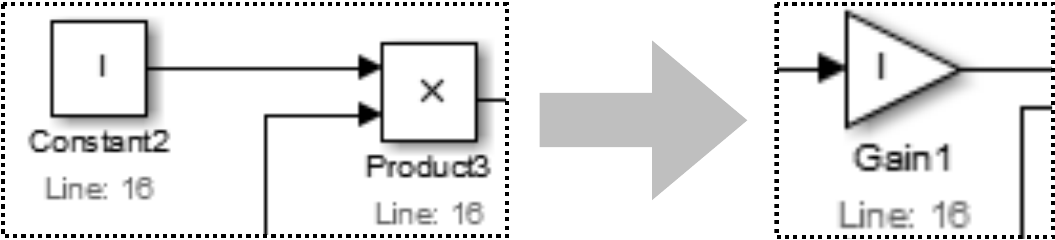
We can make an Atlas Query to identify candidates for Simplification.
var q=
index.forwardStep(nodes(XCSG.Literal)).intersects(index.tagged(XCSG.Multiply)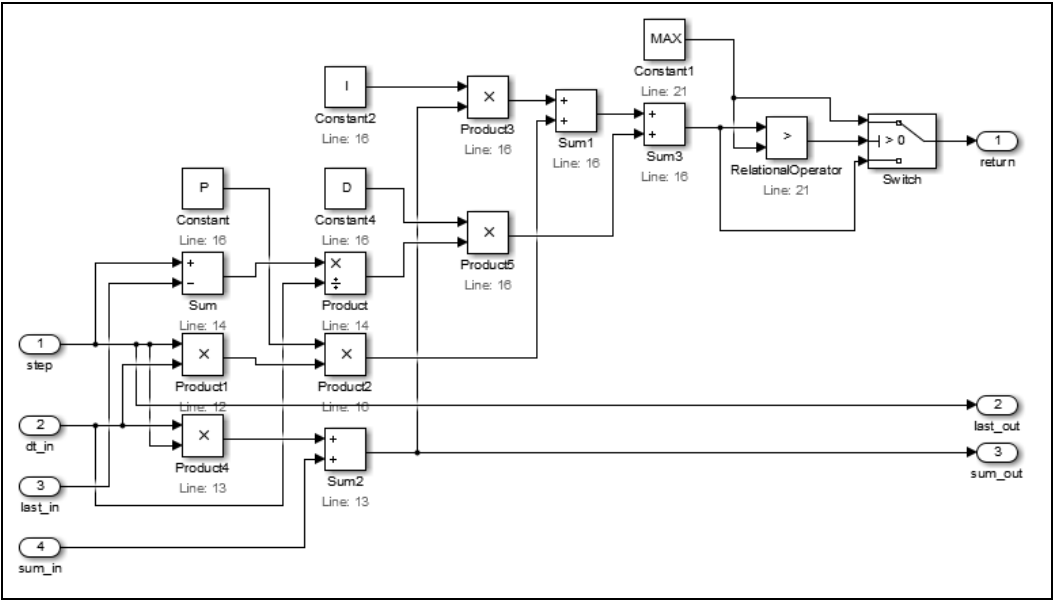
In the query above, q contains all the multiplications where one of the parameters in a constant.
B. Global Variables
Global variables are often used to write outputs and read inputs between functions. If a function uses global variables, we must render them as Inports and Outports in Simulink. Again, an Atlas Query can help here.
var
df=edges(XCSG.Contains).forward(f).tagged(XCSG.DataFlow_Node)
var
in=edges(XCSG.DataFlow_Edge).reverseStep(df).intersection(nodes(XCSG.ProgramVariable)
var
out=edges(XCSG.DataFlow_Edge).forwardStep(df).intersection(nodes(XCSG.ProgramVariable)
In the queries above in will have all the global variables that should result in Inports and out will have all the global variables that should result in Outports for the function f.
C. Conditional Logic
Conditional logic has two components. One is to identify the condition node that governs say and if statement and the other is to route values written to variables in C into Switch blocks in Simulink. XCSG directly tags data flow nodes used in continual logic
var
c=edges(XCSG.Contains).forward(f).tagged(XCSG.DataFlowCondition)
The predecessors of C can simply be routed into the conditional in port of a Switch block.
D. Other Difficult C features
Of course there are other difficult constructs in C and it is hard to predict how some companies use them. Our solution is to build those on demand depending on the needs of a client. Although conversion is automatic, we call the overall approach semi-automatic, since we may find constructs in C that are not optimally handled. However, we feel this is a powerful feature of Atlas, that we can quickly add queries to handle new cases.
V. Closing Thoughts
Tools like Modelify can be quickly and easily built using Atlas. We can leverage Atlas’ semantic precision (XCSG), scalability, and visualization capabilities. We hope that you too will use Atlas to build your own tools.
References
- Holzwarth, R. and May, K., “Analysis of Traction Control Systems Augmented by Limited Slip Differentials,” SAE Technical Paper 940831, 1994, doi:10.4271/940831.
- Thate, J., Kendrick, L., and Nadarajah, S., “Caterpillar Automatic Code Generation,” SAE Technical Paper 2004-01-0894, 2004, doi: 10.4271/2004-01-0894.
- Aho, A., Lam, M., Sethi, R., Ullman, J., “Compilers: Principles, Techniques, and Tools,” Addison Wesley; 2nd edition, 2006.
- Deering, T., Kothari, S., Sauceda, J., Mathews, J., “Atlas: A New Way to Explore Software, Build Analysis Tools,” In Companion Proceedings of the 36th International Conference on Software Engineering (ICSE Companion 2014). ACM, New York, NY, USA, 588-591.
- eXtensible Common Software Graph on the Atlas Wiki: http://ensoftatlas.com/wiki/Extensible_Common_Software_Graph
- S. K. Ahmed Tamrawi, Gui Kang. Event Flow Graphs to Verify Absence of Vulnerabilities and Malicious Behaviors. IEEE Trans. Softw. Eng., 2013.