

SimDiff Review allows large teams to visually review model changes without the need for reviewers to have a Simulink license.
A Peer Review File is a self-contained archive of everything needed to visually review model differences interactively in full detail, but can be opened as an HTML file for non-interactive viewing.
SimDiff Review enables interactive visual review of changes in Simulink models through self-contained Peer Review Files — making it easy for large teams to collaborate on model differences without requiring reviewers to have a Simulink license or to even have MATLAB or Simulink installed.
SimDiff Review supports fast graphical exploration of changes (via an embedded HTML-based model viewer), incremental auditing, notes/tags, progress tracking, and Subsystem Snapshot — all optimized for peer reviews, merge/pull requests, audits/compliance, and DevOps workflows.
Peer Review file
SimDiff’s new Peer Review feature streamlines collaboration on Simulink model changes.
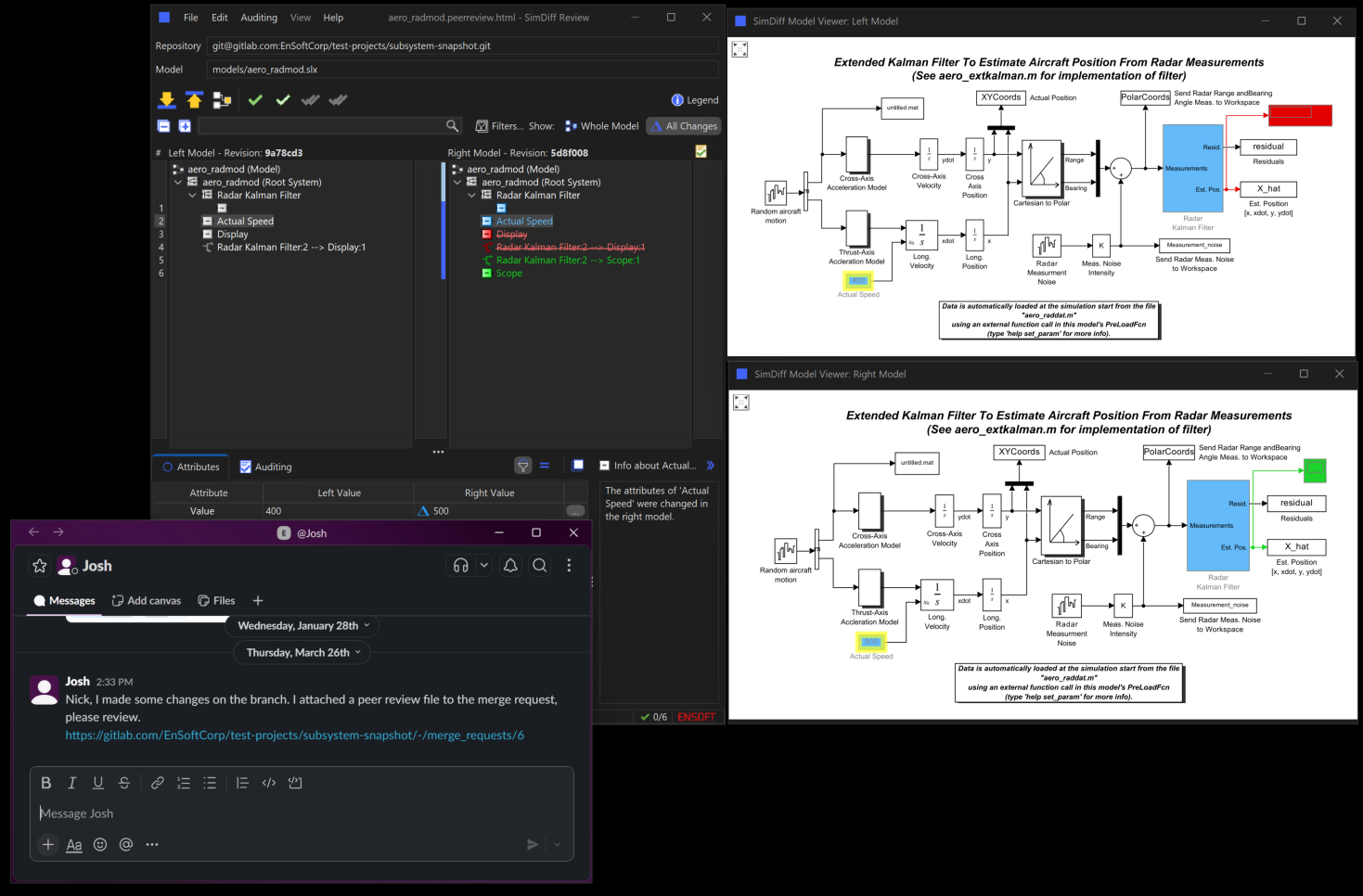
Each Peer Review file contains screenshots and a detailed list of differences found during a model comparison. Unlike static reports, these files can be opened directly in SimDiff, allowing reviewers to interactively explore and visualize the differences using SimDiff’s built-in model viewer.
Peer review files can be generated from the SimDiff user interface or you can script it using SimDiff Automation from pipelines.
Picture this: you get a chat message from a colleague asking you to review some changes in a merge/pull request where he included a Peer Review file. You can open the peer review file in SimDiff to easily and graphically glance at the changes by using SimDiff’s model viewer. Note that you don't need a Simulink license nor MATLAB installed to visualize the model.
There are two possible workflows you can use to perform the review. You can use the Subsystem Snapshot feature to attach snapshots to comments about specific differences in discussions threads.
Alternatively, you can use the Auditing in Peer Review feature to review and comment on the differences right in SimDiff. Once you are done, you can share the automatically updated Peer Review file with your review of the changes.
A subsystem snapshot includes a model screenshot and a succinct visual summary of specific differences. From the snapshot dialog, you can zoom and pan the snapshot to the desired area of the model where you have the change that you want to comment on and you can select the list of differences that you want to include in the snapshot. Then, you can simply drag and drop from the thumbnail on the bottom-right of the dialog to share the snapshot.
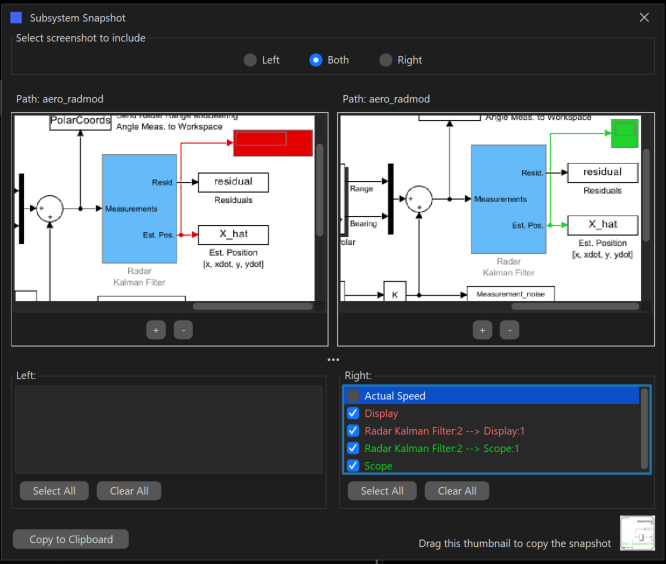
Subsystem Snapshot
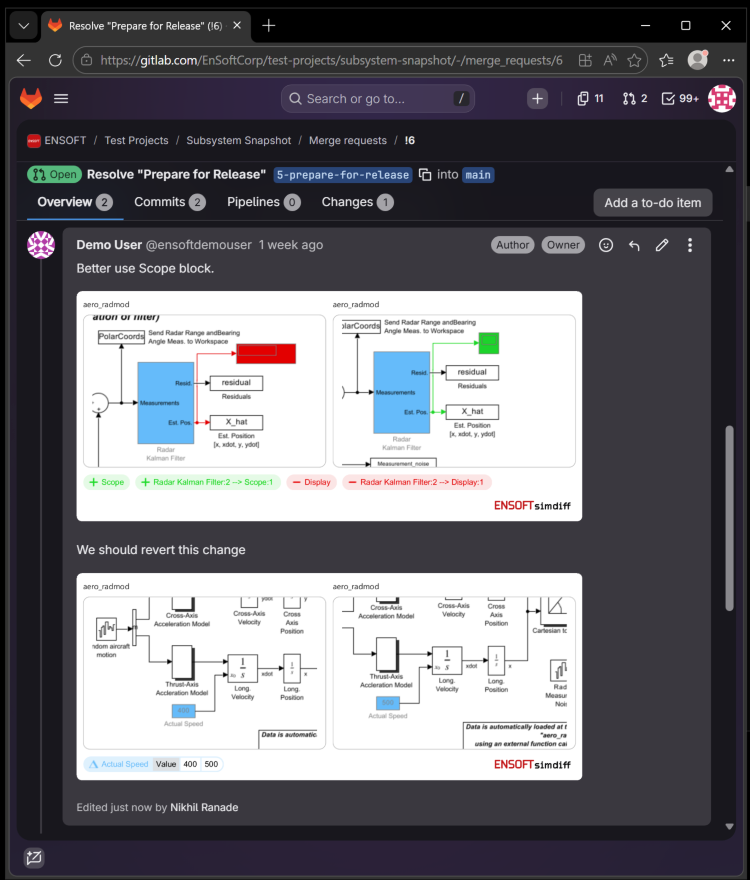
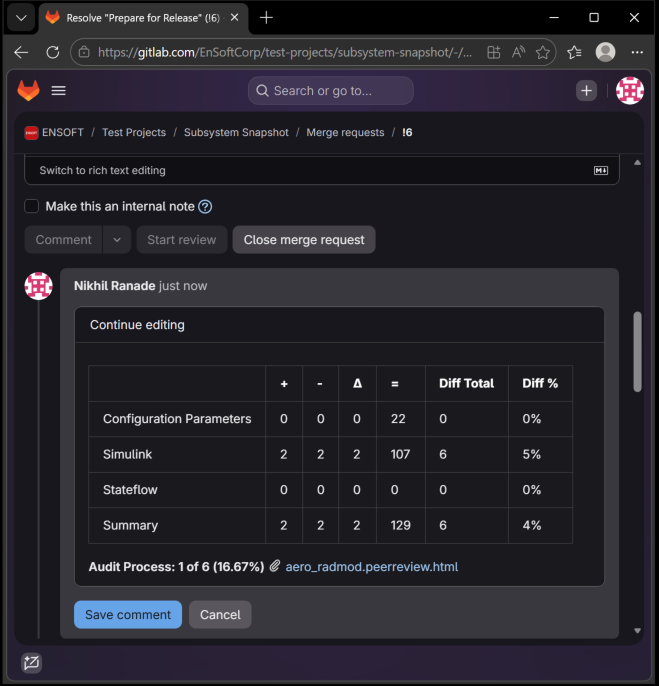
For example, suppose you want to add a comment about a change in a merge or pull request, you can add your comment and then simply drag and drop the snapshot directly to the merge/pull request. The image on the right shows 2 comments with corresponding snapshots in a GitLab merge request comment.
There are users who use PowerPoint to discuss changes. So in those cases you can use the copy to clipboard button, then paste in whatever presentation software you use.
Another possibility would be to email a colleague asking him to review some changes. So you can again drag and drop the snapshot to the email body and you can also attach the SimDiff Peer Review file and send it for review.
Notice that no Simulink license or MATLAB is required while working with Peer Review files.

Auditing
SimDiff shows all model contents by default, including blocks with no differences. However, it provides buttons on top of the trees to customize the view.
For example, clicking the “All Changes” button will adjust the view to only show items with changes.
This view is helpful during a review process.
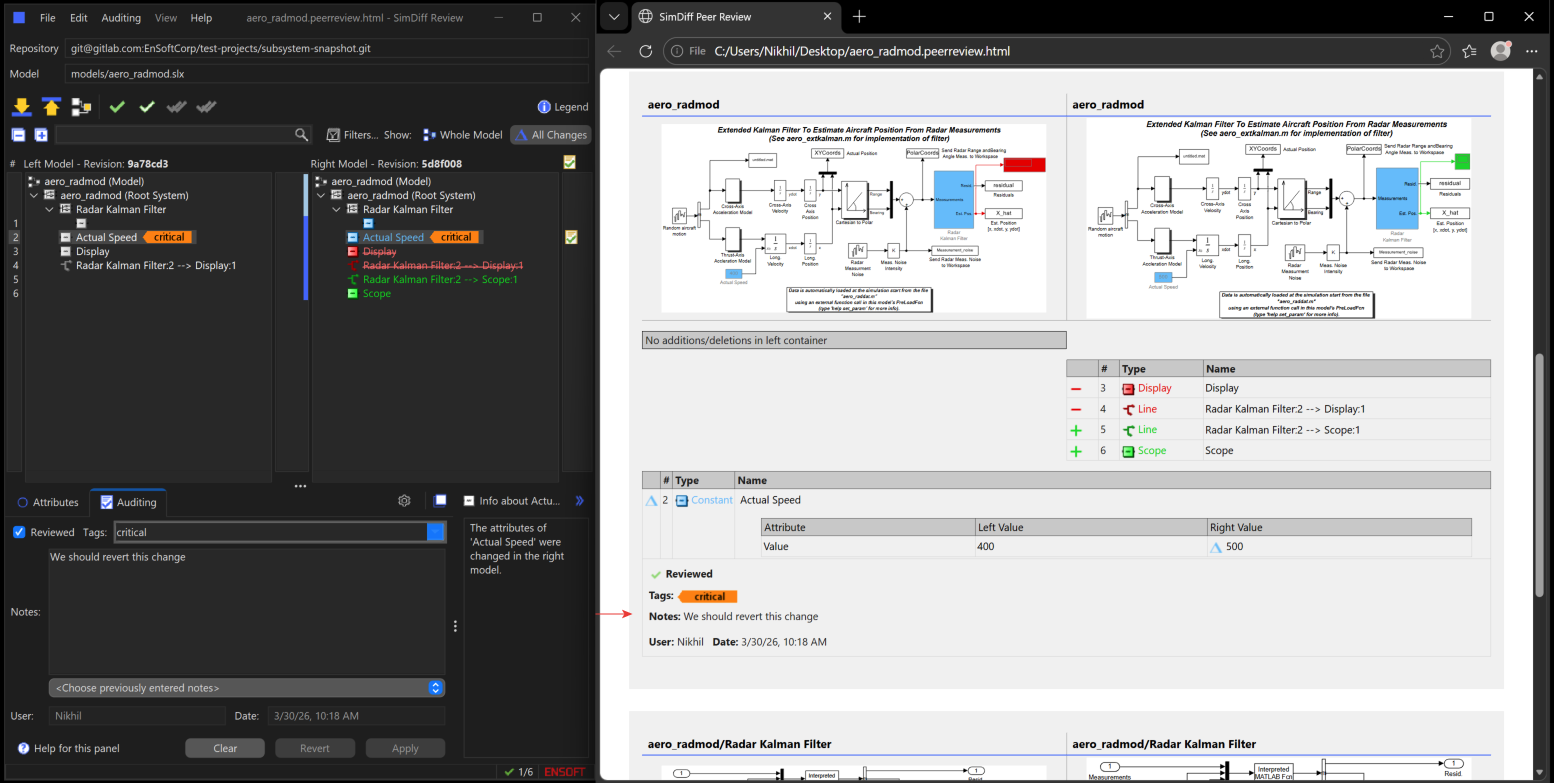
Reviewers can keep track of their progress by checking off changes on the right column as they review them. Review progress is shown in the status bar.
The auditing panel allows you to add auditing information, such as tags and notes, for the selected model element(s). The username and date are automatically filled in.
You can save the auditing information to an XML file, and later load it back into SimDiff. You can also include the auditing information in a change report, which can be saved in either HTML or XML format. HTML is the preferred format for viewing, while XML is more convenient for automated post-processing with an external tool.
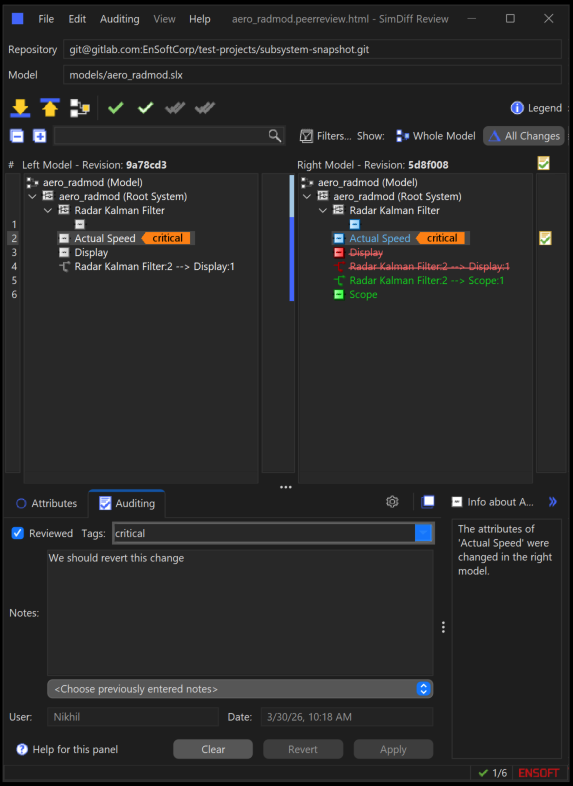
There is also a legacy workflow in SimDiff to audit differences, which was originally intended for compliance and documentation. That workflow has been extended in the Peer Review feature and now the auditing can be done in parts.
Basically, you can do some review of some of the changes and then pass the Peer Review file to a colleague who can continue with the review.
As you review in SimDiff, the auditing information is automatically saved to the Peer Review file.
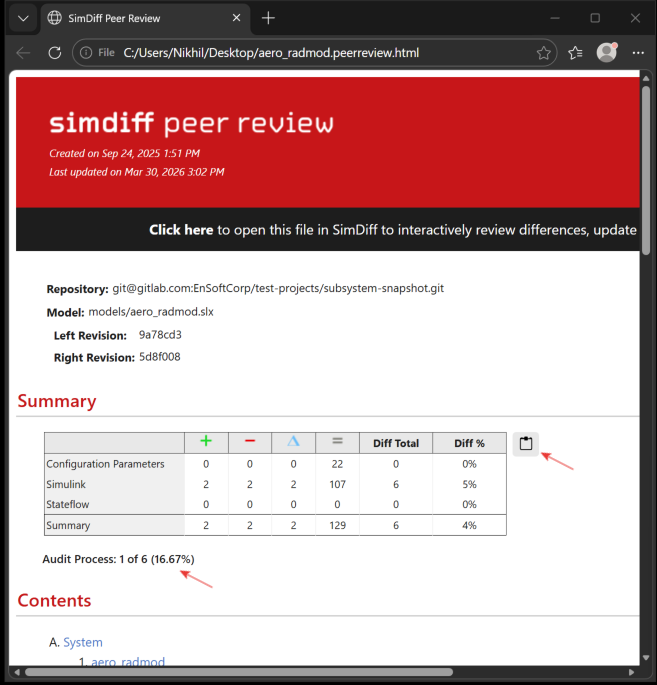
The audit progress is shown in the summary section of the Peer Review. It provides a Copy button to facilitate sharing that information in GitLab so someone else can continue with the review. You can additionally attach the Peer Review or email it so that a colleague can continue with the review.
Request a SimDiff Review Trial
Ready to try SimDiff Review? Fill out some info and we will be in touch shortly.
We can't wait to hear from you!
Version Control System Integration
SimDiff integrates with many version control systems (VCSs) and we provide articles detailing the setup process: ClearTeam Explorer, Git, Git+Git Extensions, Git+SourceTree, Mercurial, TortoiseGit, and TortoiseSVN. If you have questions about the existing documentation, or if your version control system is not listed, please contact ENSOFT support.
DevOps Integration
We also offer documentation to integrate SimDiff Automation into your DevOps workflow, using Azure DevOps, GitHub, and GitLab as examples.
System Requirements
SimDiff supports all Windows versions going back two decades and common Linux versions. SimDiff can compute differences without MATLAB/Simulink installed, though some advanced features do use it. SimDiff supports R2007b and higher, all the way up to the most recent release. Full SimDiff System Requirement details can be found here.