

SimDiff is the only Simulink differencing and merging tool with the accuracy and speed required for native Git workflows—handling models with 30,000+ blocks in under 10 seconds. Peer Review files let large teams visually review model changes without the need for reviewers to have a Simulink license.
Used by virtually every major company building complex mechatronic systems, SimDiff integrates Simulink into GitLab, Azure DevOps, and GitHub while minimizing Simulink license usage. Request a free trial and try it on your models!
30,000+ blocks in under 10 seconds
SimDiff compares models with thousands of blocks in 2.5 seconds or less, and 20 MB models with more than 30,000 blocks in under 10 seconds. That accuracy and speed come from ENSOFT’s graph theory research, so engineers can run 2-way diff and 3-way merge directly from Git.
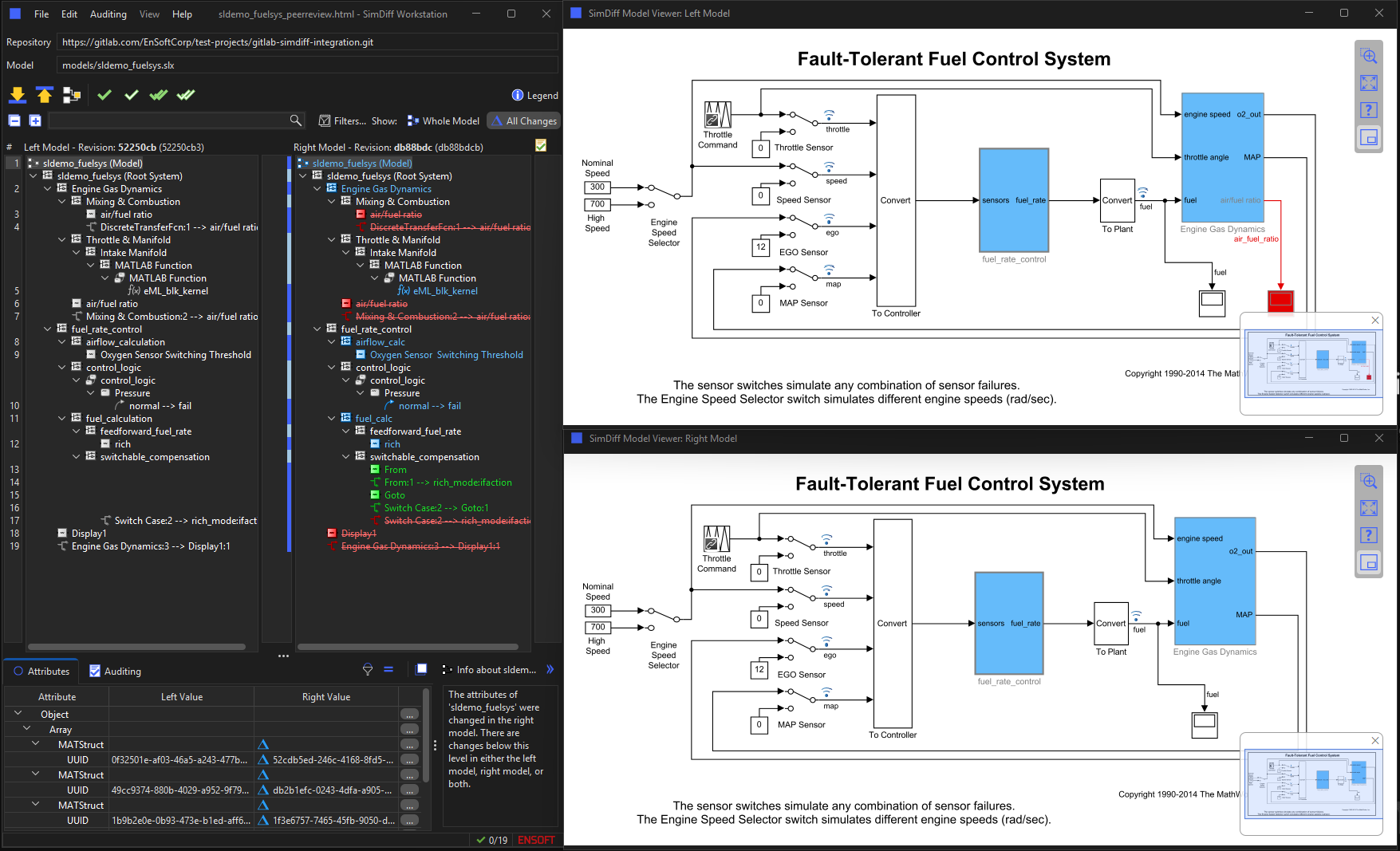
SimDiff Workstation highlights changed, added, deleted, and conflicting blocks in two model trees and in Simulink, filters out noise, and merges subsystems while tracking port and signal dependencies.

Visual review without a Simulink license
A Peer Review file is a self-contained archive of a model comparison: screenshots, the list of differences, comparison metrics, and the model hierarchies. Reviewers open it in SimDiff Review to explore the model and check off audited changes.
Neither Simulink nor MATLAB is required to open a Peer Review file or to inspect the model in SimDiff’s built-in viewer.
Subsystem Snapshots for merge request comments
Subsystem Snapshot captures a zoomed model view and the specific differences you select into one image. Drag the thumbnail straight from SimDiff into a GitLab, Azure DevOps, or GitHub comment, a chat thread, an email, or a slide deck.
Each comment carries the exact diagram and change list for the block under discussion, in both SimDiff Workstation and SimDiff Review.

Simulink changes inside every merge request
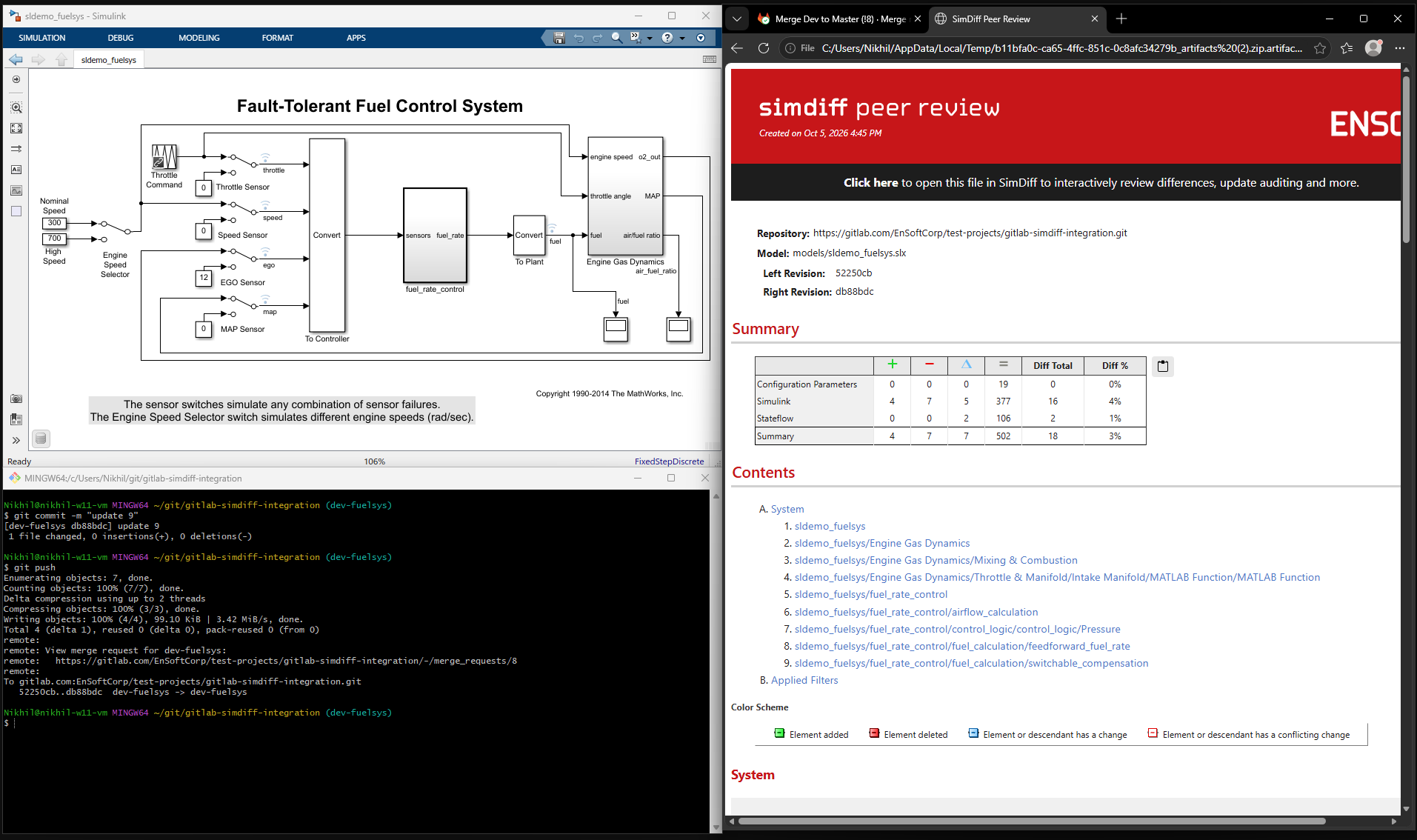
When a model change is pushed, SimDiff Automation runs in your GitLab, Azure DevOps, or GitHub pipeline, compares the new revision with the previous one, and attaches the Peer Review file and change report to the merge or pull request.
Reviewers see the commit IDs, the comparison metrics, and the changed subsystems from the request itself, and open the file in SimDiff with one click.
Request a SimDiff Trial
Thank you!
Your trial request has been successfully submitted. You can expect a response from our sales and support team within 1-2 business days.
SimDiff Editions
SimDiff Workstation
The flagship desktop edition for an engineer on a local workstation: 2-way diff, 3-way merge, filtering, auditing, reporting, Subsystem Snapshot, and Peer Review file generation.
SimDiff Automation
Command-line and container comparison for CI/CD pipelines. Generates Peer Review files and change documentation automatically on every push or merge request.
SimDiff Review
Interactive visual review of Peer Review files, incremental auditing, and Subsystem Snapshots for reviewers who do not need a Simulink license or MATLAB installed.